Phishing Training for Real Estate Brokerages and Agents

Simulated phishing, instant feedback and short training built for the way real estate teams work. Learn to spot fake wiring instructions at closing.

Phishing Training for Real Estate Brokerages and Agents

Email risks at the closing table

Every real estate transaction runs on email. Agents, title and escrow teams and property managers share bank details, terms and instructions with people they may never meet. Criminals know that. They watch inboxes, imitate staff and send buyers fake wiring instructions before closing. OutPhish offers phishing training for real estate teams that need to practice spotting these fake messages before money moves.

OutPhish is a phishing simulation and training platform. It sends simulated phishing email to a brokerage or title agency, records how each person responds, and gives feedback right away. Staff see the red flags they missed and complete a short refresher. Administrators see who needs more training. A phishing simulation software tool works best when the practice feels real. For real estate, that means fake invoices, urgent payment changes and last minute wire instructions.

Why Do Brokerages Use Phishing Training For Real Estate?

Brokerages use phishing training for real estate because closings move fast. A busy agent may click an invoice link without checking the sender. A transaction coordinator may act on an email that looks like it came from the title company. Before a wire moves, call the title or closing contact on a number you already trust. Simulated phishing helps staff build that habit under realistic pressure.

OutPhish also supports a wider security awareness training program. An admin can choose the email platform style, tone and frequency. Tests can be weekly and training can be due annually or after a failed test. The goal is short practice that fits around showings, listings and closings.

What Should Title And Escrow Teams Practice In A Phishing Simulation?

Title and escrow teams should practice the messages that target wiring instructions and payments. A simulated email might appear to come from Accounts Payable and ask the reader to approve an invoice before 5 pm. Another simulation might imitate a closing agent and say the wiring details have changed. Staff learn to look for urgency near closing, unfamiliar addresses and requests for account numbers.

  • Make one rule clear from the first conversation: wire instructions will not arrive by email.
  • Confirm by phone using a known number before sending any money.
  • Turn on multifactor authentication for agent and closing staff email.
  • Treat last minute payment changes as a warning sign.

Real estate teams receive a steady flow of messages from buyers, lenders and vendors. That volume turns them into targets. Realistic practice gives them a better chance to pause before a wrong click.
Built for real estate brokerages and title teams

Practical phishing drills and short lessons that fit the closing calendar and show who is ready.

Wire fraud practice

Send fake wiring instructions so staff learn to verify before acting.

Closing day protection

Build caution around last minute changes to payment details.

Risk visibility by person

See which agents and escrow staff need more training.

Short training refreshers

Staff finish simple lessons after a failed test.

Admin reports

Track opens, clicks and form submissions over time.

Brokerage and title team views

Run training for offices, agents and closing staff.

How a real estate phishing drill works

Walk through the OutPhish screens from setup to reports, designed for brokerage and title teams.

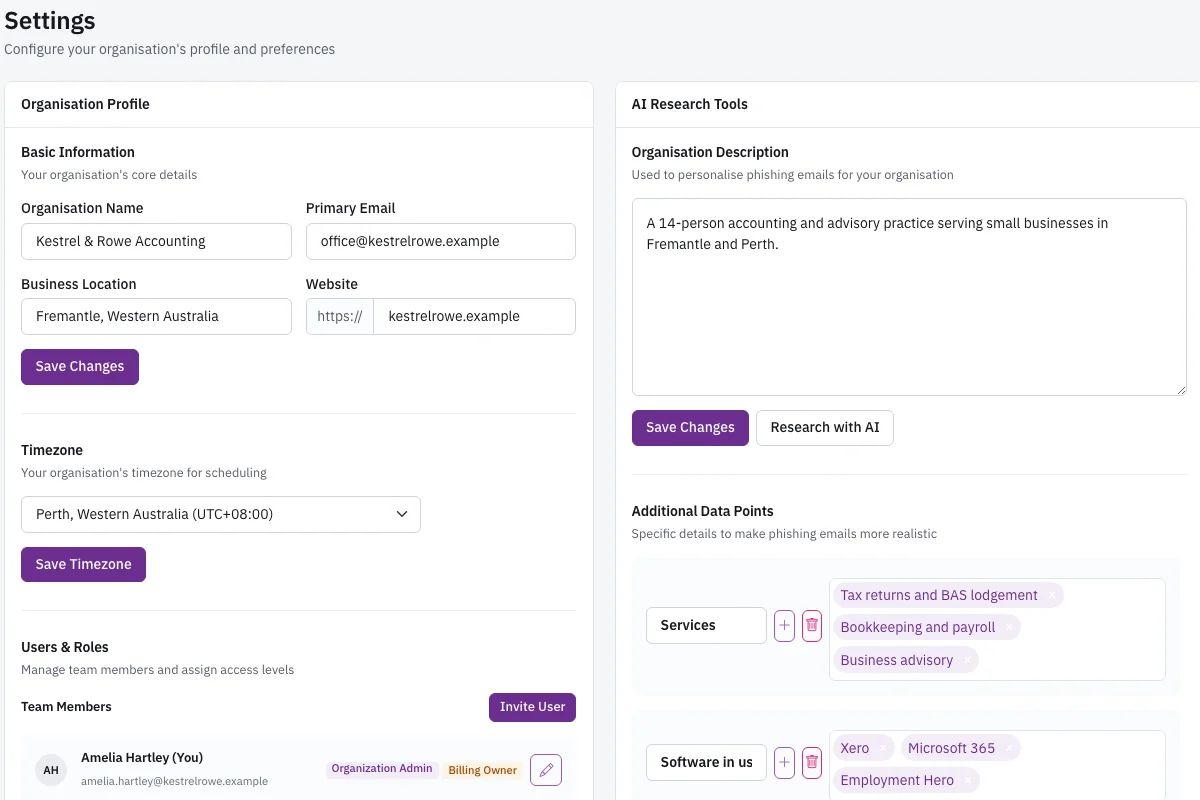
Settings page with organization profile and AI research panel showing services, software and locations.

Set the organization profile

When you first open the settings page, you add your brokerage or title company name, services and locations. OutPhish shows an AI research panel that it built from public web pages. The panel may list the software you use, the offices you operate and the names of leaders. An administrator reviews every field and edits anything that is wrong. The staff names and email addresses are not sent to the AI model. This profile gives the simulation writer context about real estate closings and property work. Before the first test, the admin follows the whitelisting guide so messages arrive in inboxes. The screen is the starting point for everything else.

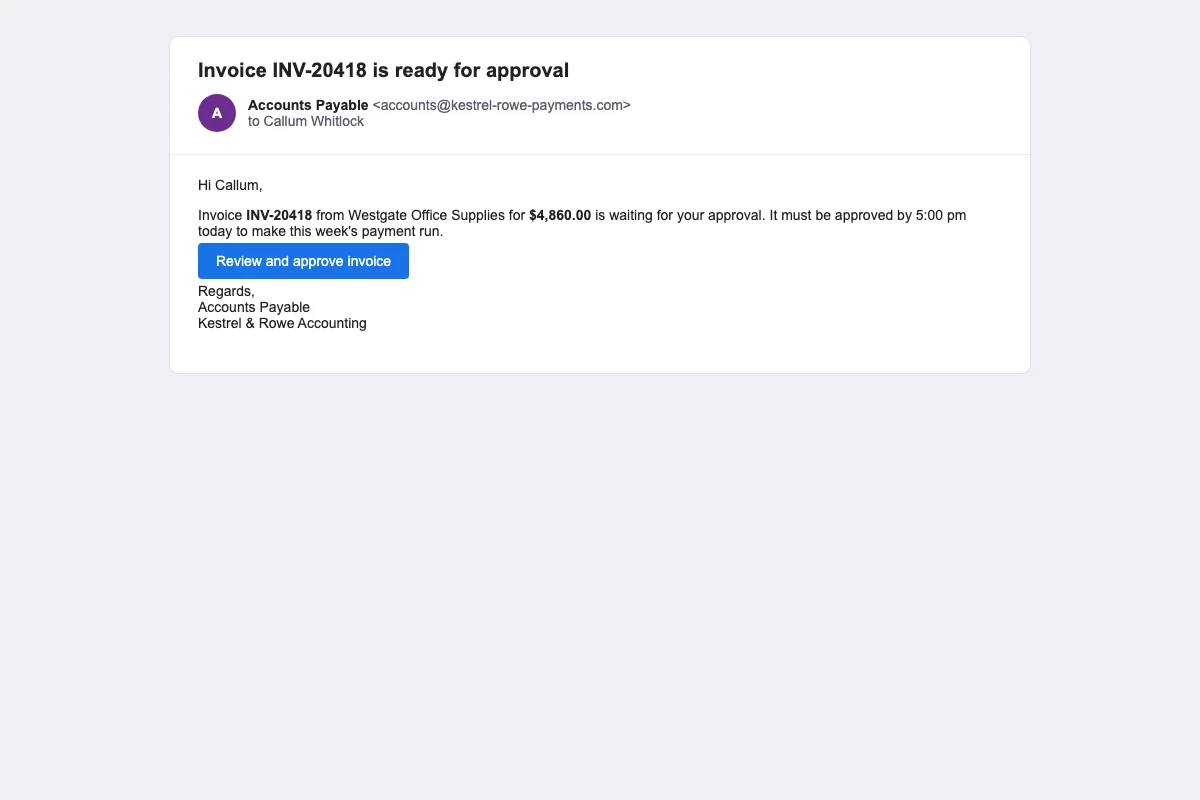
Simulated Accounts Payable email asking the reader to approve an invoice before 5 pm.

Preview a simulated invoice

The simulated email reads like ordinary business email. It appears to come from Accounts Payable and asks the reader to approve an invoice before 5 pm. The message includes a link. A busy agent or transaction coordinator may feel pressure to act quickly. OutPhish records whether the person opens the message, clicks the link or submits a form on a simulated sign in page. It never collects what someone types. The tone and sender name follow the style you set for your organization. The goal is not to embarrass staff. It is to show how a realistic message can get one wrong click during a closing.

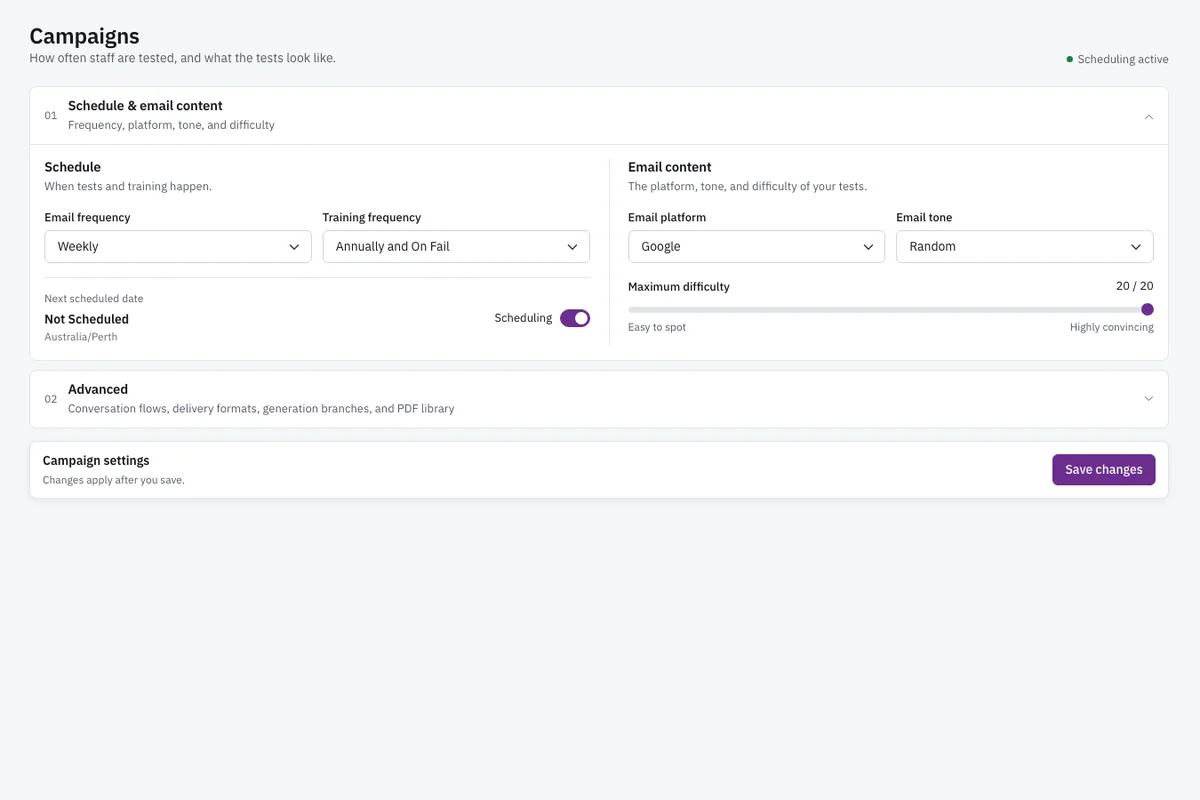
Campaign settings showing email frequency, training frequency, email platform, tone and maximum difficulty.

Choose campaign settings

On this screen an admin sets how often simulated emails go out, such as weekly. You also choose the training schedule, such as once a year and again after any failed test. Email platform choices include Microsoft 365 and Google, so tests can look like the systems your brokerage uses. You pick the tone and maximum difficulty. OutPhish schedules each person's next test and increases difficulty one step with each clean response. A click drops the difficulty, and a submitted form resets it. This keeps practice challenging but not constant. The settings work for small real estate offices and property management teams with mixed roles.

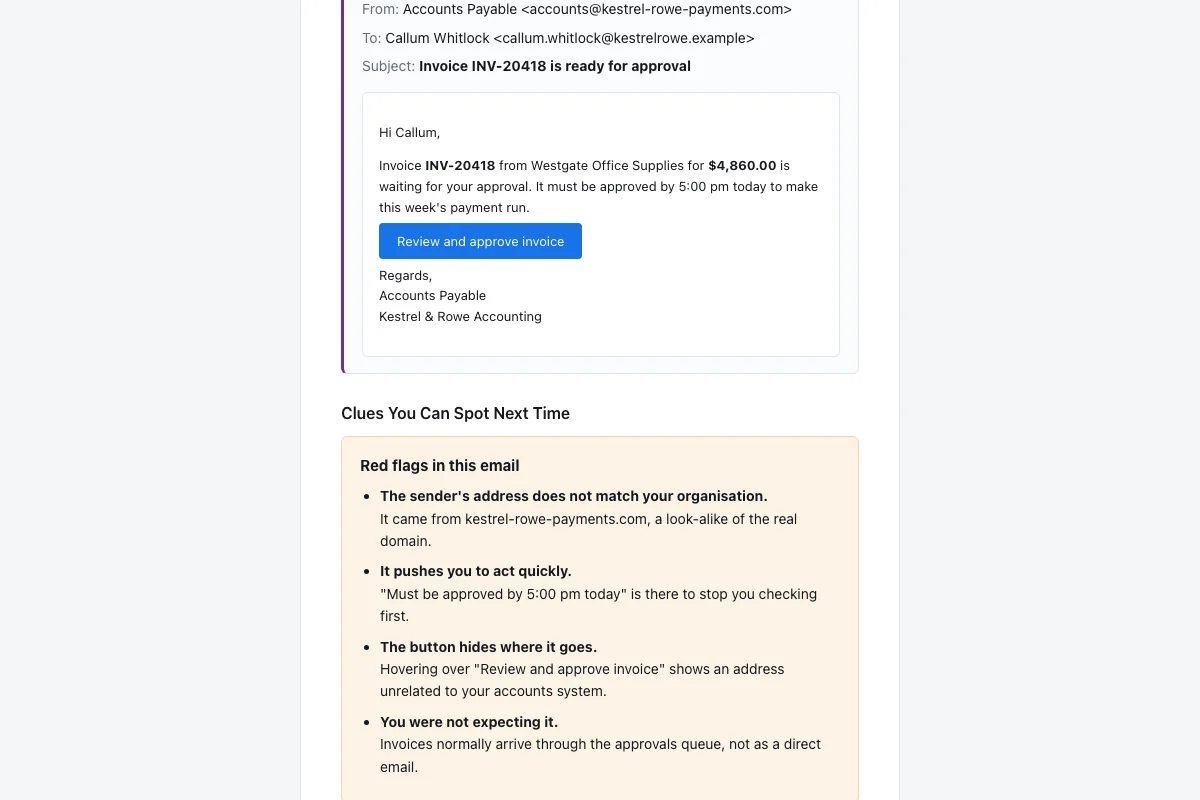
Feedback email showing the simulated message again and a list of missed red flags.

Review instant feedback

After someone clicks, OutPhish sends a feedback email immediately. It shows the original simulated message again and highlights the cues the person missed. For a fake invoice, those cues might include the urgent deadline, an unfamiliar sender, a wrong domain or a request to approve money under time pressure. The feedback also gives short tips that apply to real estate work, such as verifying wiring instructions by phone. The employee then completes a brief training refresher. That way the mistake becomes a lesson within minutes. Administrators can see the same feedback later in the person's record.

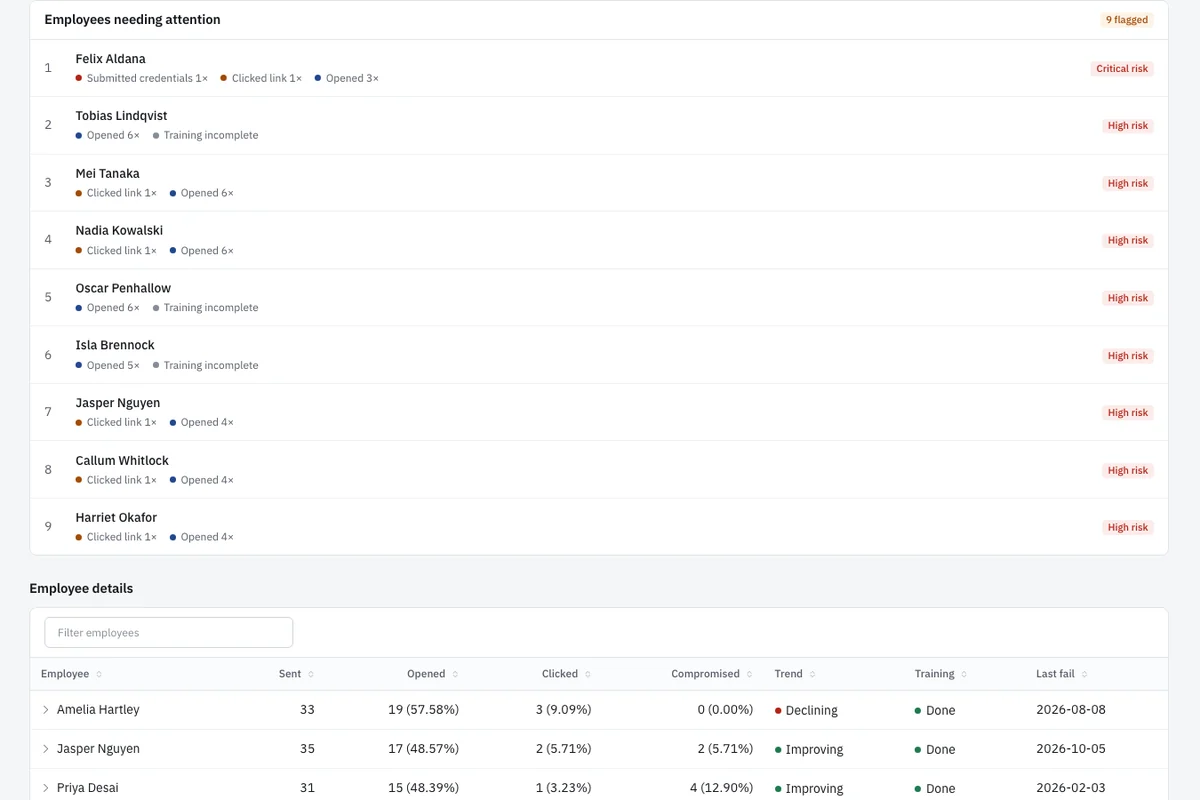
Employee list with click, open and submit actions and risk labels for each person.

Find people who need attention

The people needing attention screen lists staff who clicked, opened or submitted information on a simulated page. Beside each name you see the action taken and a risk label. You can spot an agent who opens but does not click, a coordinator who clicked a fake invoice link, or a manager who submitted a form. The list helps you decide who gets extra coaching and who should complete a refresher first. Because real estate teams share inboxes and transaction updates, these records help team leaders focus on specific behavior. You can export the information or open a person's full history.

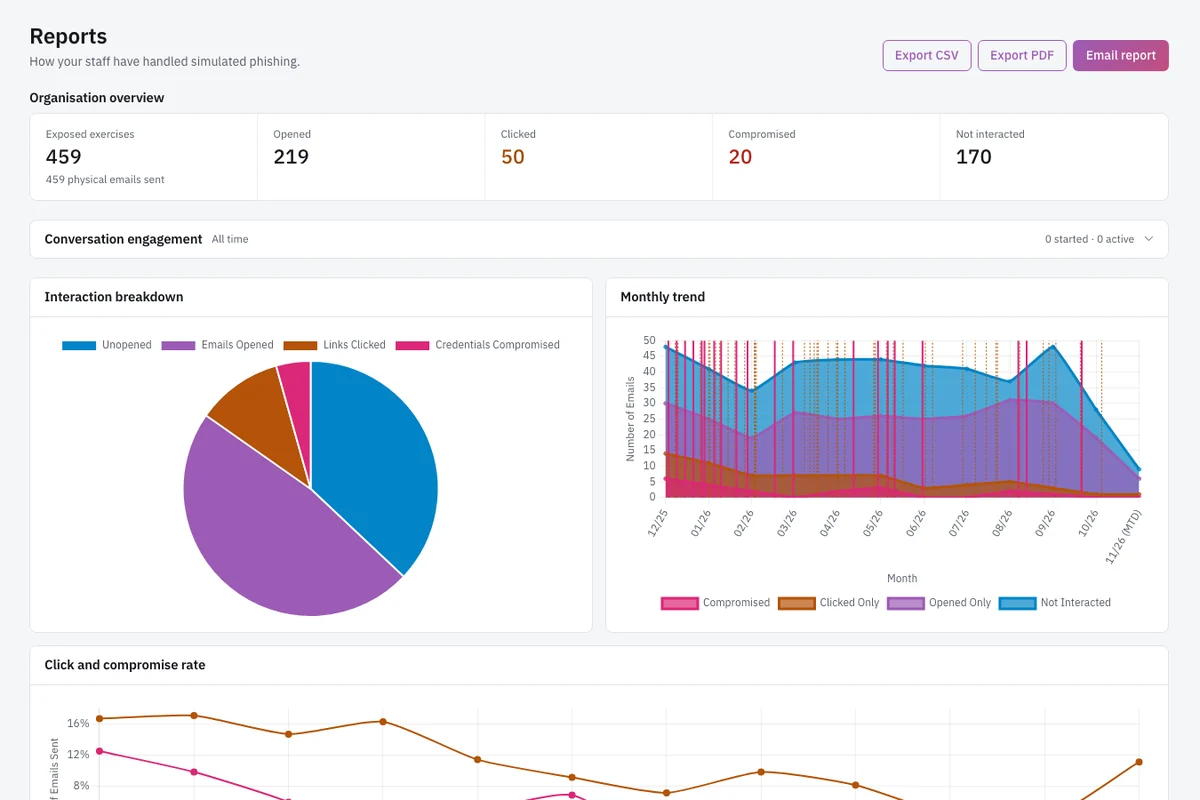
Reports page with opens, clicks, compromised credentials, a pie chart and a monthly trend chart.

Read report trends

The reports page shows organization wide numbers for emails sent, opened, links clicked, compromised credentials and messages reported. An interaction pie chart breaks down the latest campaign. A monthly trend chart shows whether click rates and credential submissions are changing over time. Real estate managers can use this evidence to decide when to increase or reduce training frequency. Reports can be exported to CSV or PDF and shared with owners or partners. You can also download each person's audit record. That record is documentation you can keep and share with insurers, auditors or clients. The chart gives managers a quick view of team improvement.

Real estate email risks and practical habits

What is real estate wire fraud?

Real estate wire fraud is a scam in which criminals divert closing funds by sending false payment instructions. Often they break into, or imitate, an email account belonging to the agent, the title company, the closing attorney or the lender. They watch a transaction and wait for the moment when the buyer expects to pay.

Then they send fake wiring instructions just before closing. The message may look like it came from the closing agent. The email may use the correct names, transaction details and property address. If the buyer follows the instructions, the money moves to a bank account the criminal controls. Recovery is difficult after the wire is sent.

For a brokerage, this risk touches every deal. The daily flow of email between agents, lenders, title staff and clients makes real estate teams an easy mark. OutPhish helps real estate teams practice recognizing the pressure and confusion that make these messages work. This kind of business email compromise training fits the closing calendar.

Practical habits can reduce the risk. Set a payment rule before closing starts. Call a known number to confirm. Turn on multifactor authentication. Treat last minute pressure as a red flag.

How do scammers use email in real estate closings?

Scammers rely on email because closings move fast and include many parties. They may take over or mimic the account of any party in the deal. The criminal then reads message threads to learn the names, the property, the closing date and the payment details.

At the right time, the scammer sends a message that appears to be from the closing agent or another trusted party. It says the wiring instructions have changed and asks the buyer to use new account details. Some messages add urgency about a deadline or a problem with the transfer.

The email may include a link. A fake invoice can reach an agent or transaction coordinator and ask for approval before 5 pm. Real estate staff need to pause when email asks them to act quickly or change payment details.

OutPhish simulates these patterns. It sends harmless messages that mimic urgent invoice requests and instruction changes. Staff see them in a normal workday and learn to look for pressure, unfamiliar senders and last minute payment changes.

An admin can choose simulation difficulty. The challenge level moves up one notch after each clean response, up to the admin's cap. A click lowers it, and entering data on a fake sign in page resets it. This keeps practice close to the real threat without using real money.

How can agents protect clients from wire fraud?

Agents can protect clients by setting clear rules before the closing. From the first conversation, let every client know that the title company will not send new wiring details by email. Explain that last minute payment changes are not normal.

Then give clients a known phone number for the title company or closing agent. Before they send money, they should call that number, not one from an email. If a message asks for a different account, treat it as a warning sign.

Use multifactor authentication on brokerage email accounts. This reduces the chance that a criminal can take over an agent inbox. Watch for urgency right before closing. Urgent language often pushes people past their normal checks.

Agents, assistants and transaction coordinators should also practice with security awareness training and simulated phishing. That helps the whole team spot fake invoices and instruction changes before a client sees them. OutPhish feedback shows each person the red flags that were missed. Then it directs them to a short refresher.

  • Write your closing rule into every client message: payment details do not change by email.
  • Verify by phone using a number known to be correct.
  • Turn on multifactor authentication on all brokerage email accounts.
  • Treat an urgent closing change as a warning sign.
  • Run simulated phishing drills that include fake invoice and wire change messages.

Agents can reinforce their advice with phishing training for real estate that mirrors these threats. The drill should match the email patterns seen in actual closings.

What should a buyer do before wiring closing funds?

A buyer should stop and verify before sending any money. Use a number you already trust, not one from the wiring email. Call the title or closing contact directly.

Buyers should not rely on the contact information in the same message. Read the number from a previous statement, a verified website or a business card received earlier. Ask the closing agent to confirm the account name and numbers. If anything differs from what you expected, do not send the wire.

Treat any last minute change to wire details as a serious warning. Real estate companies should tell buyers this in writing and in person. The rule is simple: no email change, no urgent new account, no exception.

If a buyer thinks a transfer went to the wrong account, they should contact their bank immediately. They should also file a report with the FBI through ic3.gov.

A real estate team can reinforce this advice with phishing training. Simulations that include fake wire changes help staff remember what to say to clients before closing.

Answers for real estate teams

You can run tests weekly or monthly. OutPhish lets an admin choose the email frequency. Short regular practice helps agents and escrow staff keep the habit. The platform also schedules training after a failed simulation and at least annually. This connects reminders to actual behavior. A small office can start with a low frequency and increase it later. The key is consistency, not volume. Real estate teams should include fake invoice and wire change messages in the rotation.

Yes. Title and escrow teams can run simulations that look like fake wiring instruction changes and invoice requests. The platform records whether each person clicks, opens or submits information. Staff receive instant feedback with the red flags they missed. Administrators see a list of people who need attention. This helps closing staff practice the pause before they act on payment instructions. You can also set training to be due after a failed test.

Yes. Administrators can choose simulation settings that produce realistic messages about invoices and payment changes. The AI organization profile gives the writer context about your services, software and office locations. OutPhish inserts staff names after the content is written. It never sends actual bank details or collects passwords. The goal is to help agents and title staff see what a fake instruction looks like before a real one arrives.

The agent immediately receives a feedback email. It shows the simulated message again and lists the red flags that were missed. The feedback gives quick tips and asks the person to complete a short training refresher. The click also lowers that person's difficulty one step, and a submitted form resets it. Administrators see the behavior in the people needing attention screen. No one is publicly shamed. The record is used for coaching.

Yes. The Free plan covers 1 to 15 staff with no card needed. It includes the full platform. A small real estate office can run simulated phishing and security awareness training at no cost. Paid plans start at US$19 a month for 16 to 25 staff. Yearly billing gives two months free. There is no setup fee. A small brokerage can use phishing training for real estate staff without paying until it grows.

No. If a person enters anything on a fake sign in screen, OutPhish notes only that a submission happened. The text they typed is not sent anywhere or kept. Simulated emails do not collect real bank details. Personal data and staff details are never used to train the AI provider. Staff names and email addresses stay out of the AI model. Only public web page data may be used to build the editable organization profile.

OutPhish provides a whitelisting guide with delivery settings. Your email admin adds those settings so simulated messages reach inboxes. Email filters outside OutPhish can still affect delivery. Follow the guide before the first campaign. Administrators can also choose a custom sending domain. The setup takes a few minutes. After that, reports show how many emails were sent and opened. This improves delivery.

Yes. You can enter each person individually or upload a CSV file with their details. You can archive people who leave. Each person receives simulations based on their job role and the organization profile. OutPhish schedules each person's next test using the frequency you choose. Reports and audit records stay available for everyone in the active list. This is useful when a brokerage grows.

Reports show emails sent, opened, links clicked, credentials submitted, messages reported and interactions. Managers can export results to CSV or PDF or email the report. An audit record for each staff member can be downloaded at any time. You can pass these records along to insurers, auditors or clients. The monthly trend chart helps owners see progress over time. It gives owners a clear view of how the team is doing.

OutPhish stores the platform and its database in Sydney, Australia. Your information only moves outside that storage for the providers named in the Privacy Policy. Backups are locked with a key that only OutPhish controls. This hosting arrangement keeps your records in one central place. Data location can be important for real estate companies that handle sensitive transaction details. If you have more questions, see the OutPhish FAQ.

Yes. Staff members who complete a training module receive a certificate. Administrators can send training reminders and schedule refreshers. The certificate is a record of completion. You can share audit records with insurers or auditors as documentation of your training activity. Small brokerages often find this useful during annual reviews. Real estate offices can keep these records for their own review or pass them to business partners.

Start phishing training for your real estate team

Free for up to 15 staff. No card needed. Build the habit that protects closings and clients.

Start free
Emailsupport [at] outphish [dot] com
Ask a question
Start free