Phishing simulation software that adapts to each person

Schedule safe fake phishing emails, deliver instant feedback, and see who needs training. Built for small and midsized organizations.

Phishing simulation software that adapts to each person

Simulated phishing that fits your team

OutPhish is phishing simulation software for small and midsized organizations. Your staff receive realistic fake emails that match how your business actually works. Each test records opens, clicks, and whether someone types a password into a simulated page. Anyone who clicks gets instant feedback and a short security awareness training refresher. You review results per person and across the whole organization.

This page explains how to choose phishing simulation software, how OutPhish schedules tests, and what you see during setup. You can also read about phishing simulation and training.

What is Phishing simulation software?

You use phishing simulation software to send safe fake phishing emails to staff and record how they respond. A good program writes messages that use the names, services, and file types people already see at work. It does not punish mistakes. It uses each click as a teaching moment.

OutPhish keeps the practice relevant. Each simulation is written from an AI organization profile that you review and edit. Administrators can set how often tests go out and how difficult they become.

What should I look for in phishing simulation software?

Look for realistic emails, automatic scheduling, difficulty that adapts, instant feedback, clear reports, and simple delivery setup. The checks below cover what we recommend.

  • Realistic detail: simulations should mention the services and software your staff actually use.
  • Automatic scheduling: tests should keep running without manual work.
  • Adaptive difficulty: difficulty should rise for people who pass and drop for people who click.
  • Instant feedback: a click should lead to a training message right away.
  • Clear reporting: you should see opens, clicks, and password submissions per person.
  • Simple delivery: whitelisting steps should be straightforward.

OutPhish follows those checks. You can run one test on demand or schedule simulated phishing automatically. Staff cannot predict the send time because each test goes out at a random time within the period you choose.

Why OutPhish works for small teams

These features help you run simulated phishing without adding manual work.

Realistic simulated phishing

Messages reflect your services, software, and staff roles.

Automatic scheduling

Tests go out at random times within the period you choose.

Adaptive difficulty

Difficulty adjusts after every simulation and click.

No password collection

Simulated pages record only that a form was submitted, never what was typed.

Clear reports

See opens, clicks, submissions, and monthly trends.

Instant refresher training

People who click get feedback and training right away.

How OutPhish works from setup to report

Six screens show how simulated phishing tests are written, delivered, and measured.

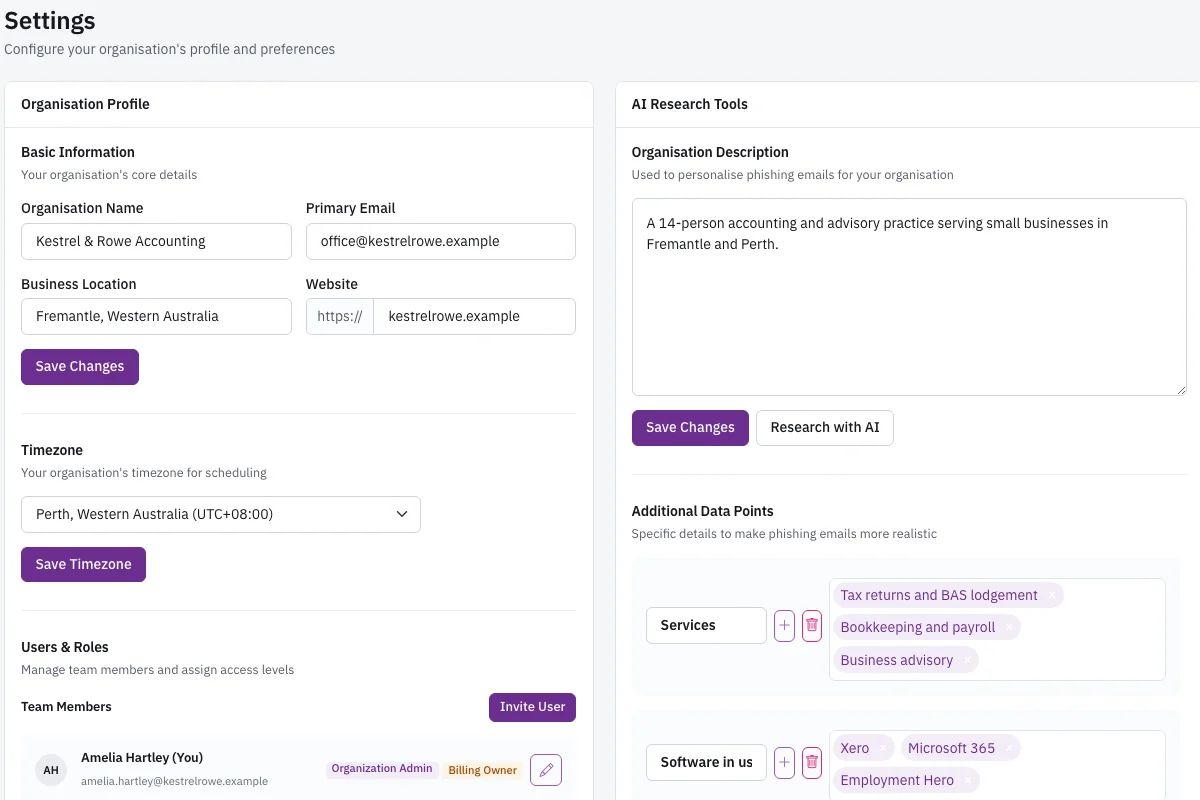
Settings page showing the editable organization profile and the AI research panel with description, services, and softwa

Review the AI organization profile

The settings page shows the organization profile and the AI research panel. OutPhish researches your website and other public web pages to gather a description, services, software in use, and other details. Administrators can review and edit every part of the profile before simulations are written. This matters because AI output can be inaccurate, and editing keeps the details realistic. The profile is reused across simulations, so staff see messages that fit the way your organization actually works. You can return to this screen any time to correct a service name, add a software product, or remove information that is not relevant. The content generation step never receives staff names or email addresses.

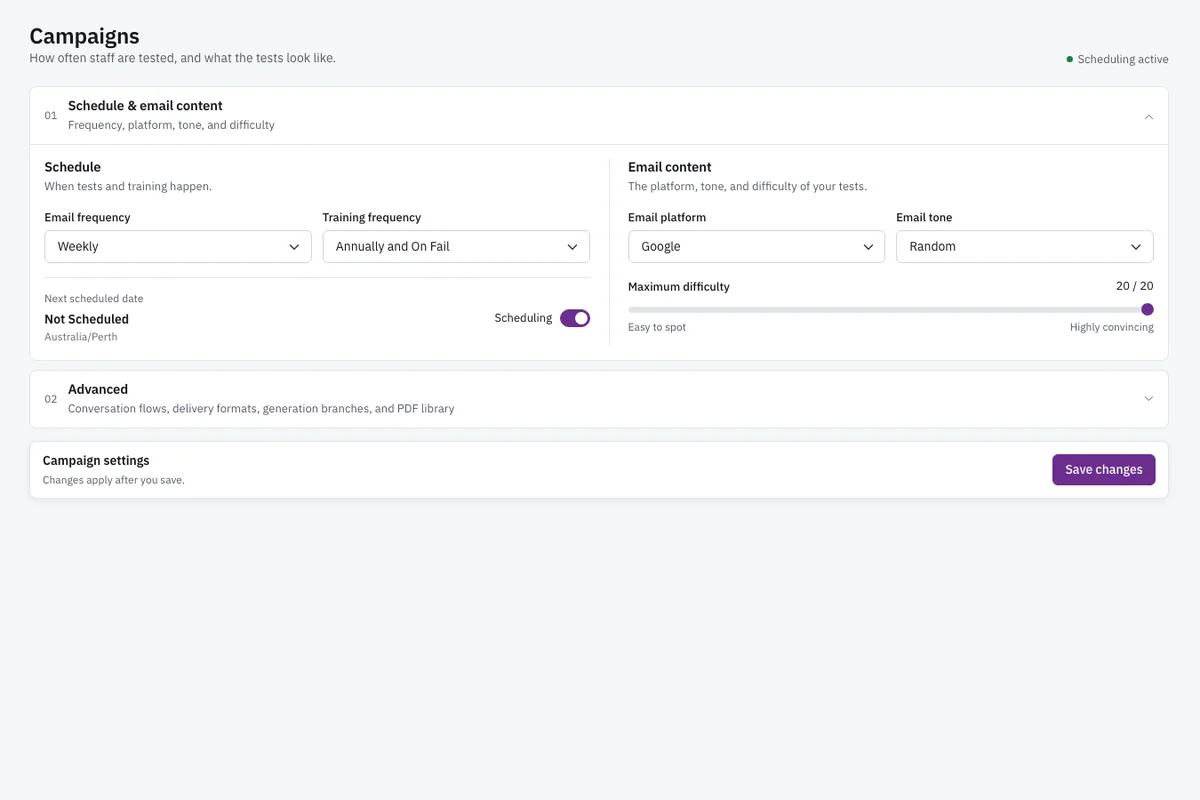
Campaign settings screen with email frequency, training frequency, email platform, tone, and maximum difficulty controls

Set campaign frequency and difficulty

The campaign settings screen lists email frequency, training frequency, email platform, tone, and maximum difficulty. Administrators set how often simulated phishing tests are sent and how often training is required, including yearly and after a failed test. They choose an email platform style for the test messages, such as Microsoft 365 or Google, and pick a tone. They also set the maximum difficulty a simulation may reach. Each person's difficulty rises one step with each simulation, eases after a click, and resets after a form submission on a simulated sign-in page. These settings keep the program controlled and consistent.

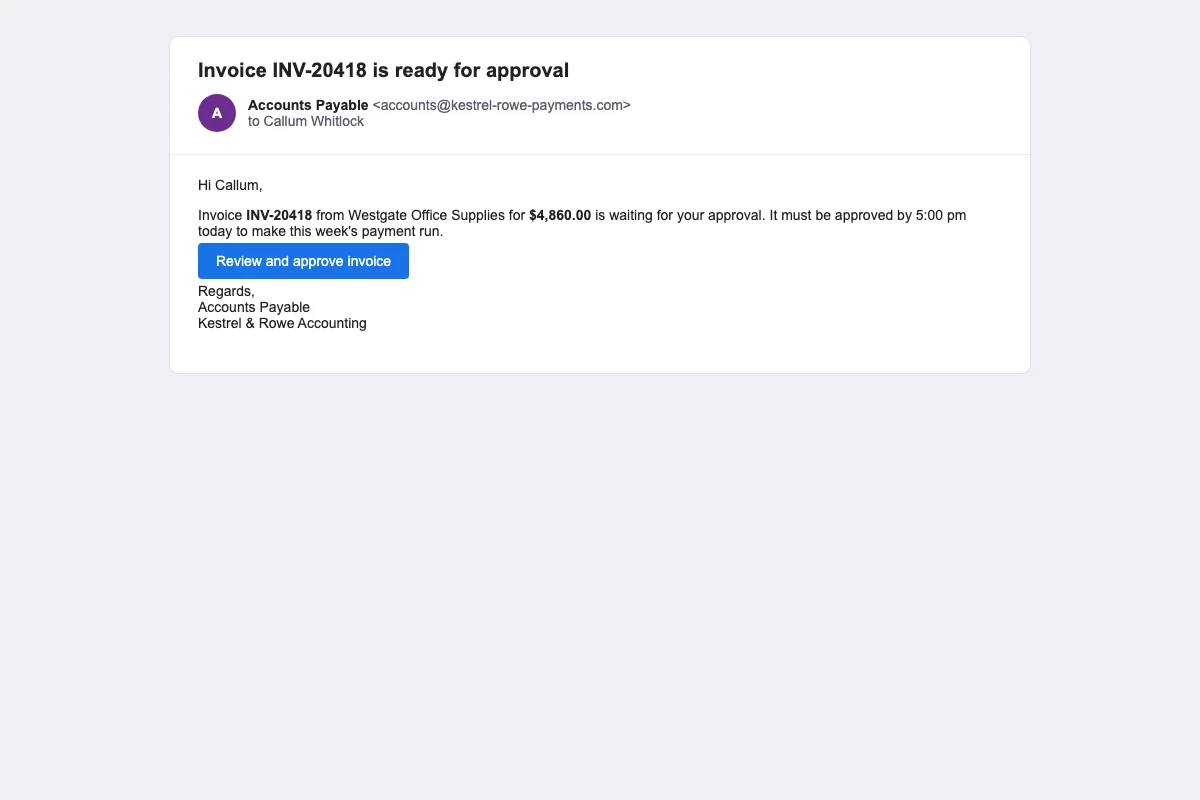
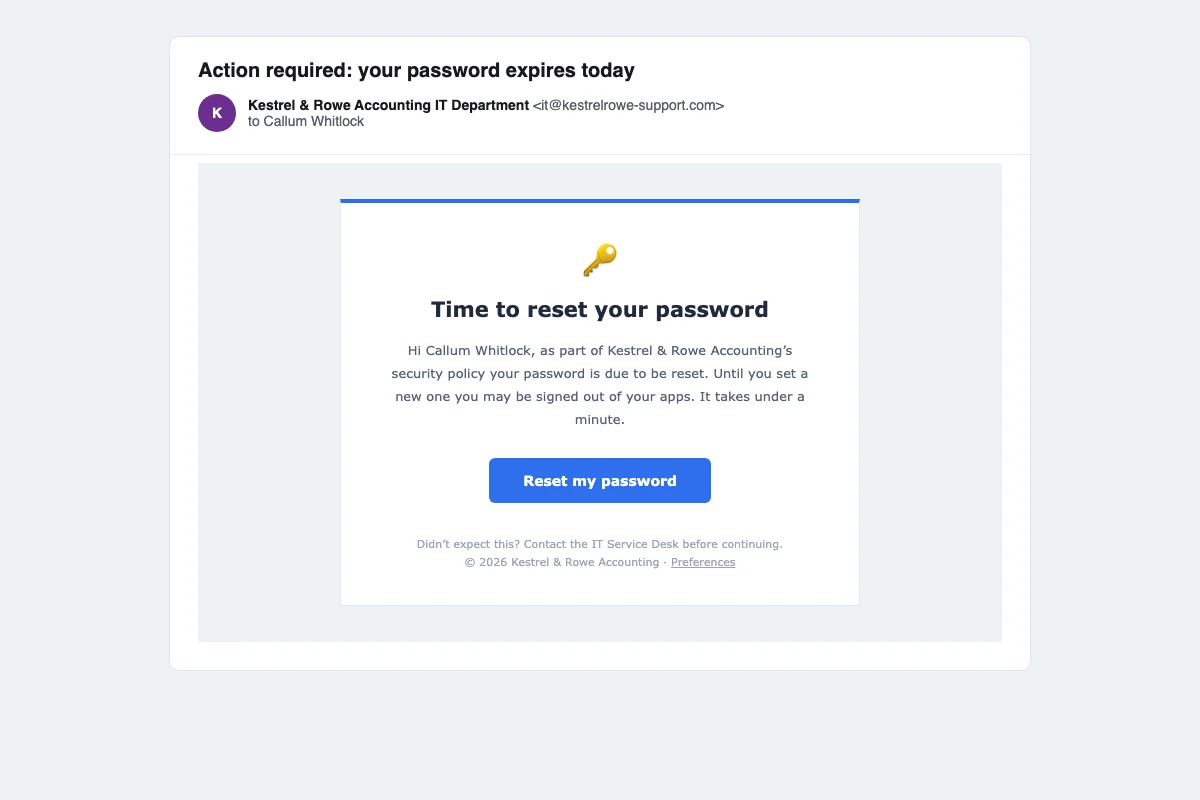
Simulated email from Accounts Payable asking the reader to approve an invoice before 5 pm.

A simulated invoice request from Accounts Payable

This screen shows a simulated email from Accounts Payable asking the reader to approve an invoice before 5 pm. The message is written for the organization and the staff member's role. It looks like a normal request with a deadline, a link, and familiar financial wording. The person must decide whether to click, report it, or ignore it. When the recipient clicks the link, OutPhish marks the click using a one-time link code. It then checks IP address and browser details to separate a real person's click from an automated email scanner. The goal of this screen is to practice recognizing urgent payment requests.

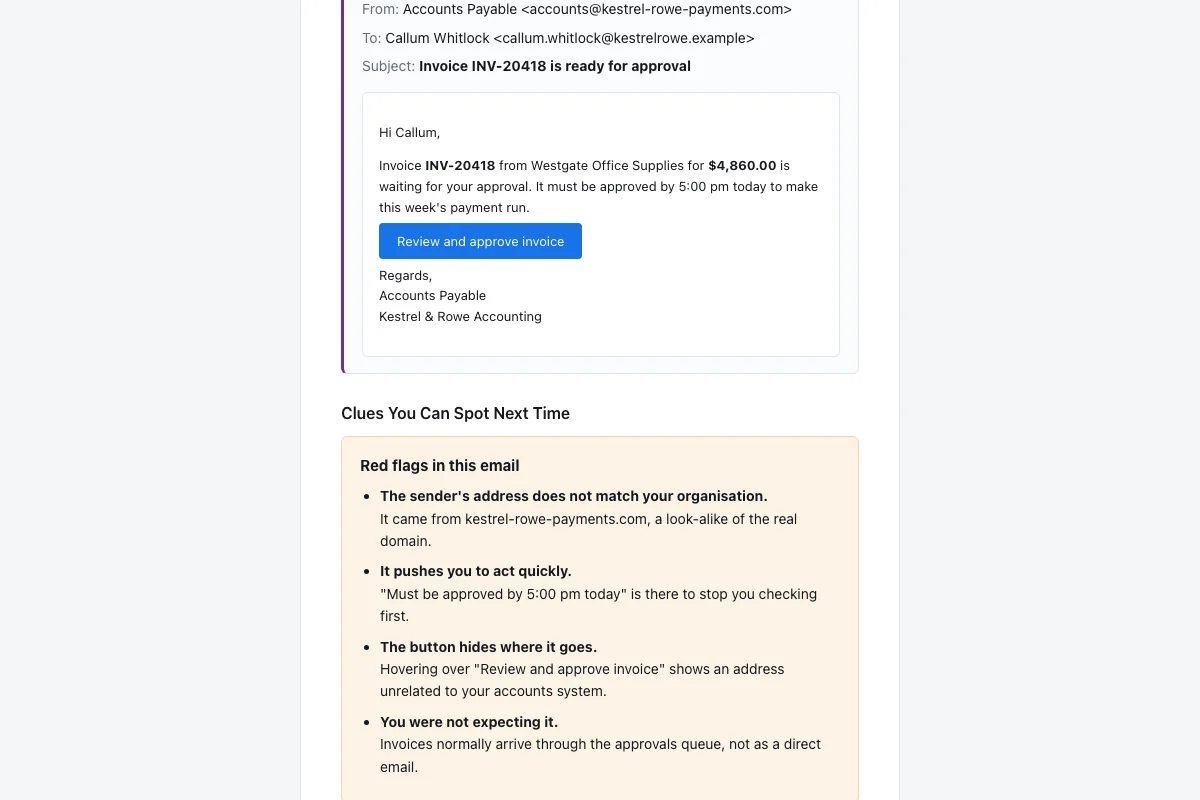
Feedback email showing the original simulated message again and a list of red flags that were missed.

Instant feedback after a click

The feedback email shows the simulated email again and lists the red flags that the person missed. Anyone who clicks gets this message straight away. It explains what the simulated email was, which details should have made them pause, and what to do differently next time. Then it asks the person to complete a short security awareness training refresher. This keeps the response supportive rather than punitive. Administrators do not have to send the feedback manually. The person sees the original message beside the red flags, so the lesson is connected to the exact decision they made.

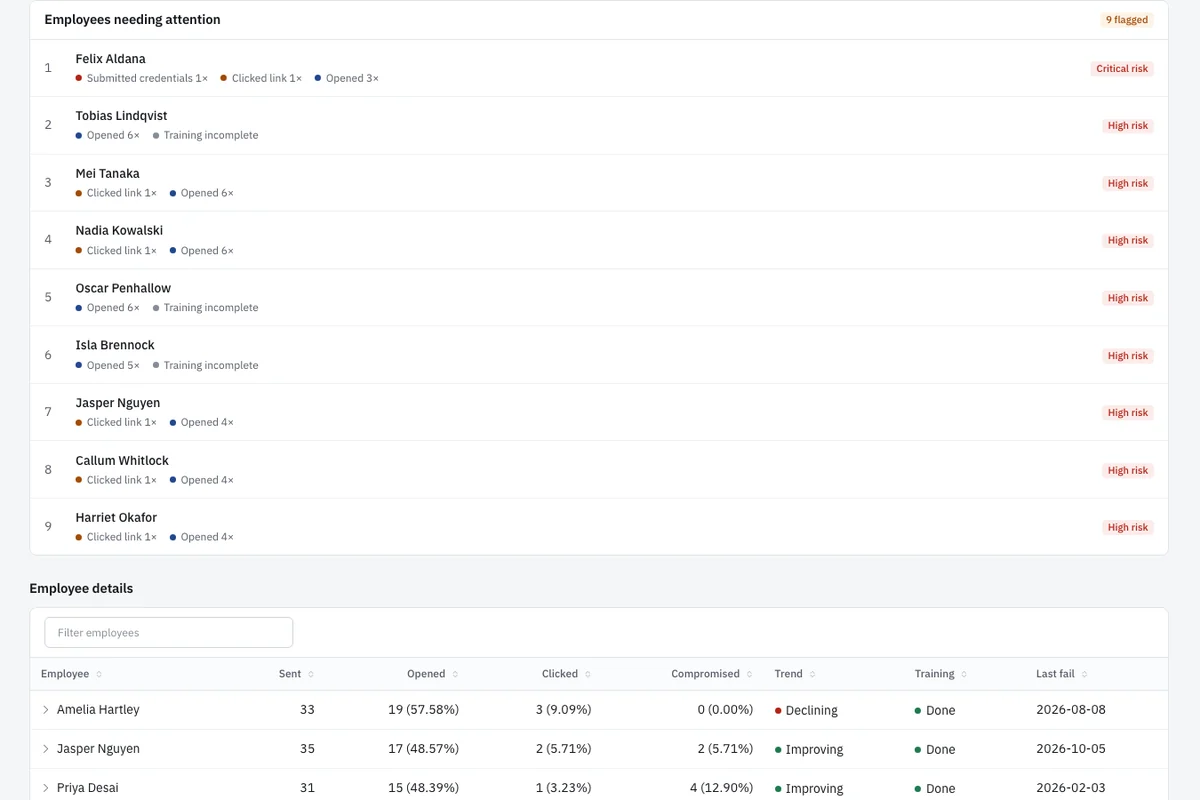
List of employees needing attention with actions such as clicked, opened, or submitted and a risk label for each person.

Employees who need attention

This screen lists employees needing attention, each with what they did and a risk label. The list shows whether a person clicked a link, opened the email, submitted a form, or reported the message. It also labels risk, for example high, medium, or low. Administrators can sort by behavior or risk and see who has not completed training. The list answers the practical question of who needs follow up. You can click into a person for their individual history and download an audit record. The goal is to spend time where it is needed rather than guessing.

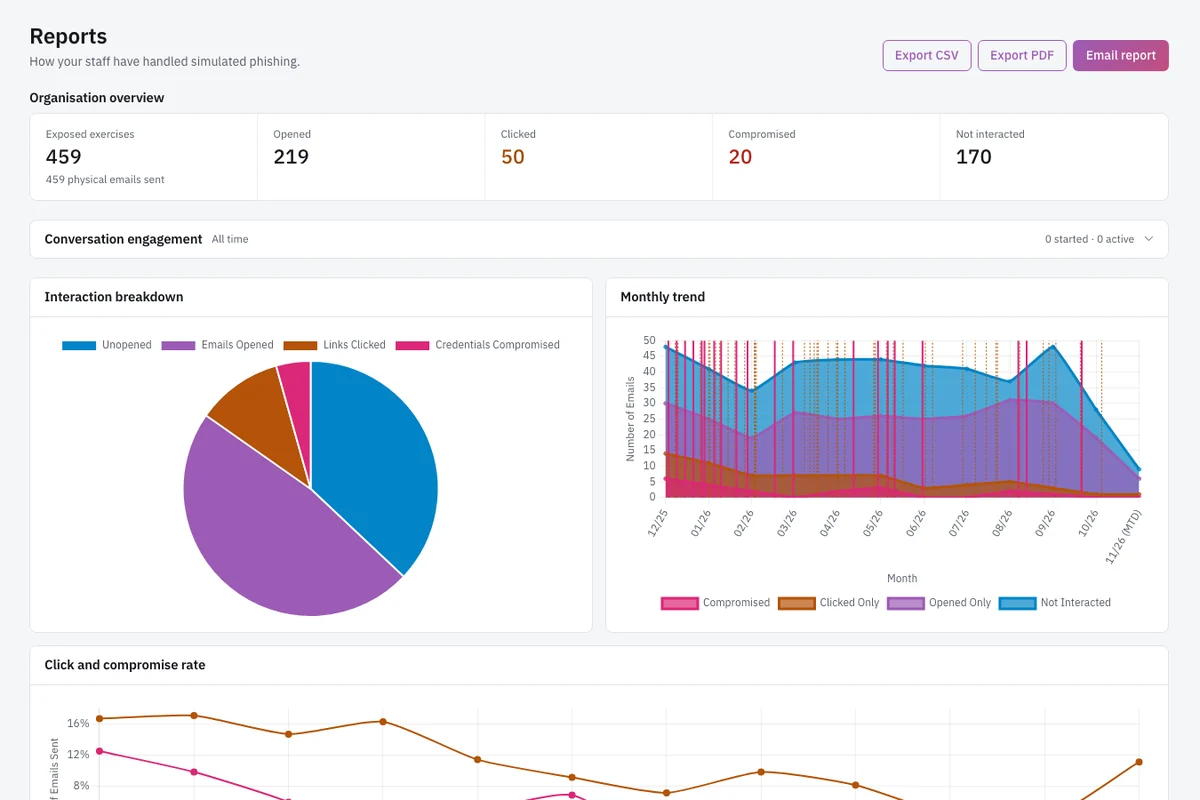
Reports page with opens, clicks, compromised credentials, an interaction pie chart, and a monthly trend chart.

Reports with trends and interactions

The reports page shows opens, clicks, compromised credentials, an interaction pie chart, and a monthly trend chart. Compromised credentials mean form submissions on simulated sign-in pages, not actual passwords. The pie chart breaks down interactions by type, and the trend chart shows how click and compromise rates change over time. Administrators can view organization-wide numbers and drill down to per-person results. Reports can be exported to CSV or PDF or emailed to an address. This helps you share records with insurers, auditors, or clients without sending raw staff data.

How OutPhish fits your security program

How do simulated phishing tests work?

Simulated phishing tests work by sending safe fake phishing emails to staff and recording how they respond. In OutPhish, each email is written by an AI model from the organization profile and the person's job role. Staff names and email addresses stay out of every AI request. Names are added to the message after the writing step. The AI provider never trains its models on customer or staff information.

A realistic simulation matches how your organization really works. It uses the software and services people see every day. Automatic scheduling keeps the program running without manual work. Adaptive difficulty prevents the training from becoming repetitive for strong performers. Instant feedback turns mistakes into short lessons. Reports show progress per person and for the whole organization.

Opens are recorded with a tiny image. Because some inbox programs block images, open counts can run low. Clicks are recorded with a unique link code. OutPhish checks IP address and browser details to separate a person's click from an automated email scanner. If a staff member types on a fake sign-in screen, the system logs only the submission action. The characters entered are never transmitted or saved.

Anyone who clicks gets an email straight away. The email shows the simulated message again and lists the red flags the person missed. It then asks them to complete a short security awareness training refresher. The refresher is a security awareness training module with an assessment. On completion, the staff member receives a certificate. The training requirement repeats yearly and after any failed test. This closes the loop between error, feedback, and practice.

OutPhish also supports an optional multistage simulation. In a conversation style simulation, the simulated attacker replies to the staff member. That style is useful for people who pass simpler tests and need more realistic pressure. Administrators decide whether to use it.

Can simulated phishing tests be automated?

Yes, simulated phishing tests can be automated in OutPhish. Administrators set the test cadence and the training cadence, including yearly training and refreshers after a failed test. OutPhish then schedules each person's next test. Each scheduled message leaves at an unpredictable time inside the window you pick.

Automatic scheduling removes the need to remember to launch tests. You can launch one test manually from the dashboard or staff list. Difficulty rises one step with each simulation, up to the maximum the administrator sets. Difficulty eases after a link click and resets after a form submission on a fake sign-in screen. That keeps tests challenging but not unfair.

Training reminders can be automated too. Administrators can send training reminders from the dashboard. Reports update as tests are delivered, opened, clicked, reported, and ignored. You can export a report at any time, or email it.

What does phishing simulation software cost?

OutPhish bases its price on the number of staff you train. A team of 1 to 15 people costs nothing and needs no card. From 16 to 25 staff, the monthly cost is US$19. From 26 to 50 staff, it is US$39 each month. From 51 to 100 staff, the monthly cost is US$69. Above 100 people, the plan adds US$0.50 per extra staff member to a US$69 monthly base, so 150 staff totals US$94 a month.

Yearly billing gives two months free, so the yearly price is 10 times the monthly price. Setup has no fee and there is no fixed term. You can stop at any time. Managed service providers and partners can ask for separate pricing. See the pricing section for current details.

Because pricing is based on staff count, you can estimate the cost before you sign up. You can run the full platform free with up to 15 staff. You get the full platform for a small team, including reporting, instant feedback, and training. Start at app.outphish.com without entering card details.

How do I set up phishing simulation software?

Setup starts at app.outphish.com. You create an account and add employees individually or upload a CSV roster. OutPhish researches your website and other public web pages to build an AI organization profile. You review and edit that profile in settings. The profile covers your description, services, software in use, locations, and leadership. Editing is important because AI output can be inaccurate.

You then choose delivery settings. These include email frequency, training frequency, email platform, tone, and maximum difficulty. You can select a Microsoft 365 or Google style for test messages, depending on what your organization uses. You can also add a custom sending domain.

Before the first test, you add the whitelisting guide settings OutPhish provides. This helps simulations reach inboxes. Email filters are outside OutPhish's control, so the whitelisting steps matter. Setup takes a few minutes, but you should allow time for the records to apply to your mail provider.

Let your team know that the organization includes fake phishing messages as part of security awareness practice. Do not run tests secretly. Staff should know the program exists. This supports a fair learning environment and gives them a reason to report suspicious messages.

After launch, you can send a test on demand or let automatic scheduling run. You can archive people who leave, download an audit record, and export reports. The audit record is a set of records you can share with insurers, auditors, or clients. Data is hosted in Sydney, Australia. Backup copies use encryption with a key that only OutPhish controls.

Read the OutPhish FAQ for delivery and data questions.
Phishing simulation questions answered

Phishing simulation software is a platform that sends safe fake phishing emails to staff and records how each person responds. It is used to practice recognizing attacks and to see who needs more training. OutPhish writes each simulation from an AI organization profile and each person's job role. When someone clicks, the platform shows the message again with red flags they missed. Administrators see opens, clicks, and form submissions. No passwords are collected. The goal is not to punish people but to turn mistakes into short training moments.

Simulated phishing begins when OutPhish sends a safe fake email to a staff member. The message looks like a normal business note and includes a link. If the person clicks, OutPhish records that action through a one-time link identifier. It also checks IP address and browser details to distinguish a human click from an automated scanner. A tiny tracking image measures opens, but image blocking can reduce that count. If the person enters text on a fake sign-in page, OutPhish notes only the submission, not the characters. The person then receives a feedback message with training tips. Administrators see the result in reports.

Choose phishing simulation software that offers realistic emails, automatic scheduling, adaptive difficulty, instant feedback, clear reports, and simple delivery setup. Realistic messages use the services and software your team sees every day. Automatic scheduling removes manual follow up. Adaptive difficulty keeps tests challenging without overwhelming people. Instant feedback turns a click into a short lesson. Clear reporting shows each person's activity and organization-wide trends. Look for a clear whitelisting guide so messages reach the inbox. OutPhish includes these features and works for small and midsized organizations.

Yes. OutPhish automates phishing simulations so you do not have to start each test manually. You set the test cadence and training schedule. The system schedules each person's next message at an unpredictable time within your chosen window. You can launch one test manually from the dashboard or staff list when you need it. Difficulty rises one step after each simulation, eases after a link click, and resets after a form submission on a fake sign-in page. Automated scheduling keeps the program consistent without manual launches.

They receive an instant feedback email. That email shows the simulated message again and lists the red flags they missed. It also gives quick tips and asks them to complete a short security awareness training refresher. The training includes an assessment. On completion, the person receives a certificate. The click is recorded in reports so administrators can see which staff need more help. The process is supportive rather than punitive, and it connects the lesson to the exact decision the person made.

No. If an employee types on a fake sign-in screen, OutPhish logs only the fact that a form was submitted. Nothing they type reaches OutPhish. Reports and audit records do not contain password field data. A compromised credential appears as a submission event, not as the text someone entered. This protects staff privacy while still showing the behavior you need to measure. Ask any vendor about this detail when evaluating phishing simulation software.

OutPhish researches your organization's website and other public web pages to build an AI organization profile. The profile can include your description, services, software in use, locations, and leadership. Administrators review and edit the profile. Each simulation is written using that profile and the staff member's job role. The writing step does not receive staff names or email addresses. Names are added to the message after the content is created. Your data is not used to train the provider's models.

Setup takes a few minutes in the app. You create an account at app.outphish.com, add employees individually or upload a CSV roster, and review the AI organization profile. Then you choose campaign settings such as email frequency, training frequency, tone, and maximum difficulty. The main external step is whitelisting. You add the delivery settings OutPhish provides so simulations reach inboxes. Allow a little time for your email provider to apply those records. After whitelisting, you can launch your first test.

OutPhish sets its monthly price by headcount. A team of 1 to 15 people pays nothing, with no card required. If you have 16 to 25 staff, the cost is US$19 per month. For 26 to 50 staff, it is US$39 per month. For 51 to 100 staff, it is US$69 per month. When your team passes 100, add US$0.50 per extra employee to a US$69 monthly base, so 150 people costs US$94 per month. Paying yearly gives two months free. See pricing for current details.

Yes. A managed service provider can use OutPhish to run simulated phishing and training for every client from one dashboard. The MSP plan counts total staff across clients. The dashboard shows each client with staff numbers, test results, click rate, training completion, and alerts. This is a useful option for IT providers who want to offer security awareness training as a managed service. You can read about phishing simulation for MSPs.

OutPhish stores its platform and database in a Sydney, Australia data center. Personal data moves outside that location only to the service providers named in the Privacy Policy. Backups are encrypted, and only OutPhish holds the key. Admins can export a record of each employee's simulations and training whenever they need it. That record is something you can share with insurers, auditors, or clients. BCBP Holdings Pty Ltd operates OutPhish. Email [email protected] for help.

Start simulated phishing for your team

Create a free account, add your staff, and run your first phishing simulation today.

Start free
Emailsupport [at] outphish [dot] com
Ask a question
Start free