Phishing Simulation for MSPs from One OutPhish Dashboard

Give managed service providers one plan for client phishing tests, training, and reports. Add security awareness to your managed services without separate logins.

Phishing Simulation for MSPs from One OutPhish Dashboard

Run Phishing Simulation for MSPs

What is phishing simulation for MSPs?

Phishing simulation for MSPs is a way for managed service providers to run controlled phishing tests and security awareness training for every client from one OutPhish account. Instead of buying separate tools for each organization, an MSP can enroll clients, manage staff lists, and review results in one dashboard. You stay on the same plan priced on total staff across all clients. This page explains how the MSP view works, what setup involves, and what reports you can hand to clients.

OutPhish sends simulated phishing emails to client staff, records how each person responds, provides instant feedback, and assigns short training modules. Managed service providers can set each client's campaign preferences separately, including email platform, tone, frequency, and difficulty. You can open any client organization to work inside it as if you were that client's administrator.

How can managed service providers use this platform?

An approved managed service provider starts by signing up online at app.outphish.com. The Free plan covers up to 15 staff with no card. For larger groups, you can ask about partner rates. Once you are approved, the dashboard shows every client organization with its staff count, recent tests, click and password-entry rates, reports, training progress, overdue courses and alerts.

Every client has a separate workspace for its profile, staff list, campaign settings, and reports. You can import staff by CSV or add people one at a time. You also handle whitelisting for each client using the delivery guide OutPhish provides, so simulations reach inboxes. You can download reports and audit records for a single client to CSV or PDF whenever you need to share them.

  • One dashboard for every client. See test activity and training progress across the MSP client list.
  • Client level settings. Set simulation frequency, training frequency, email platform, tone, and maximum difficulty per organization.
  • Exportable reports. Download CSV or PDF reports and audit records for each client.

Each client agreement must be in writing and allow you to enroll that client's staff and share their data. The managed service provider is responsible for each client's compliance with the terms and pays for clients' use under its plan. If a client relationship ends, let OutPhish know promptly. Simulated messages can show the MSP's brand and still identify OutPhish. Read more about phishing simulation and training or the phishing simulation software features.
Benefits for Managed Service Providers

OutPhish gives MSPs one plan, one dashboard, and client level controls for phishing simulation and training.

One Dashboard for Every Client

Manage multiple client organizations without separate logins or bills.

Client Level Campaign Settings

Set frequency, difficulty, tone, and email platform for each client.

Reports Per Client

Export CSV or PDF reports for every client organization.

Central Staff Management

Import staff lists and archive leavers across client organizations.

Training Built In

Assign short security awareness modules after failed tests and yearly.

Simulated Phishing That Fits

Use AI written simulations based on each client's profile and roles.

How the MSP Dashboard Works

Six screens show how managed service providers set up clients, run tests, review results, and share training records.

Managed service provider view listing client organizations with staff counts, tests sent, click rate, and training compl

Client Organizations Overview

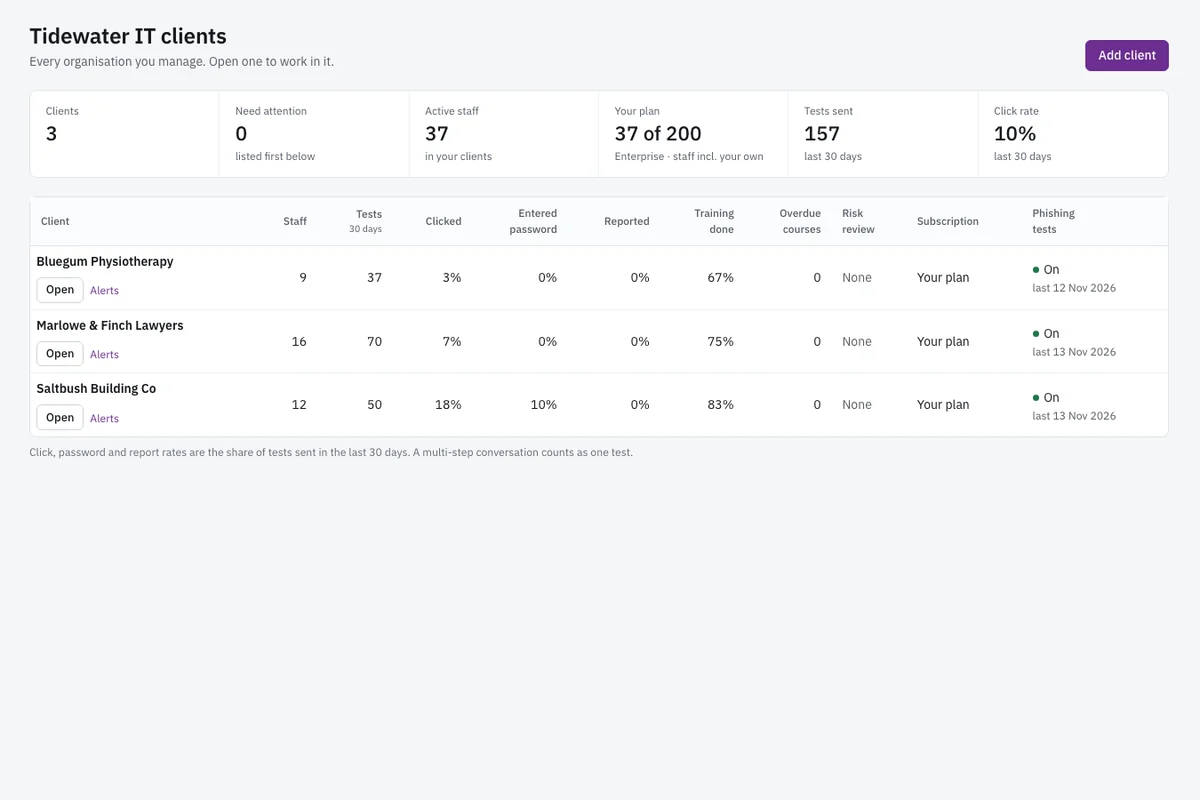
The MSP view is the first screen after login. It lists every client organization the managed service provider has enrolled. For each client you see staff totals, campaign volume, click rate, password entries, report status, training completion, overdue courses, and alerts. You can scan the list to spot which client needs attention. Opening a client takes you into that organization's workspace. You can manage staff, run campaigns, and review reports without leaving the MSP account. The view gives an at a glance summary of risk across all clients. It does not mix client data. Each client remains separate. This screen supports the main MSP workflow: check progress across the portfolio, then open one client to act. You can also see which clients have overdue training or alerts that need follow up.

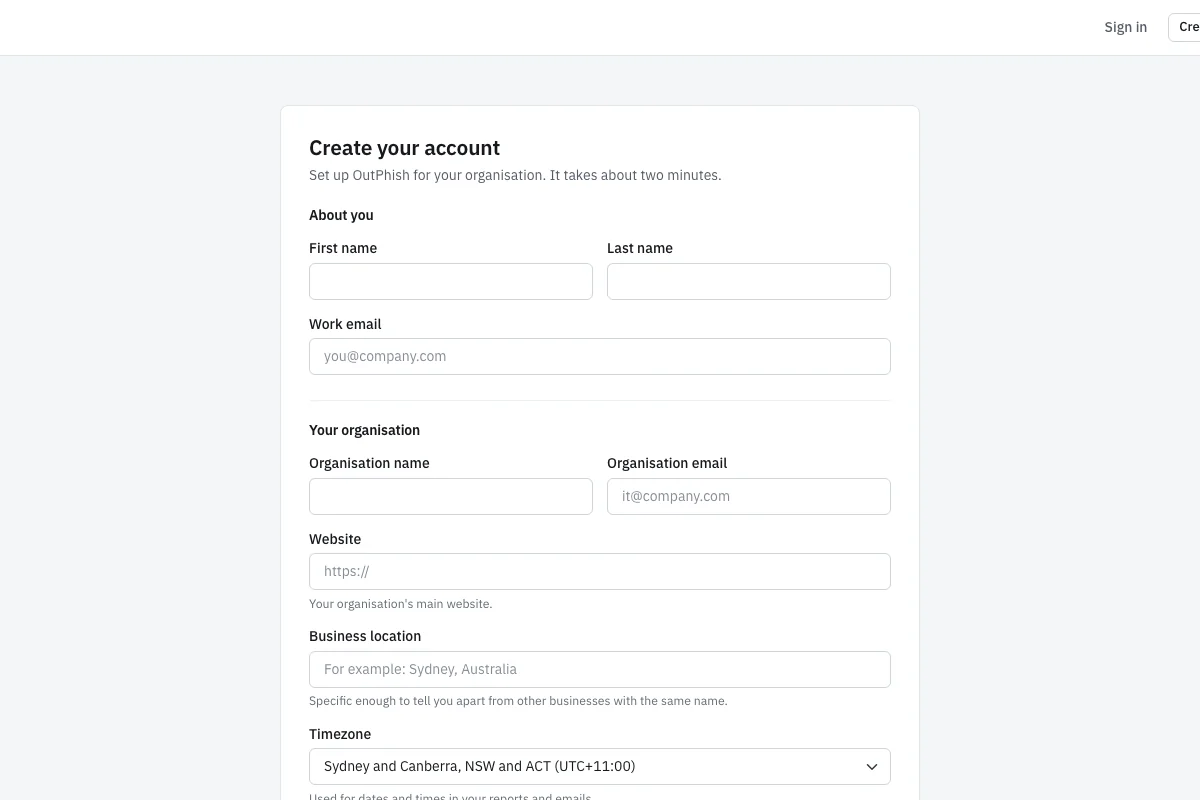
Sign up form for an MSP with fields for name, work email, organization name and email, website, business location and ti

MSP Sign Up and Client Enrollment

The sign up form at app.outphish.com collects basic details. A managed service provider enters a name and work email, then adds the MSP organization name and email. You also provide the website, business location, and time zone. The Free plan needs no card. Once the account is created, OutPhish reviews the request for MSP mode. After approval, you can enroll client organizations from the dashboard. Each client has its own profile, so you enter the client's organization name, email, website, location, and time zone. You can then add staff lists or import them by CSV. The sign up screen captures only the information needed to create the account and start a client. There is no setup fee, and you can cancel any time.

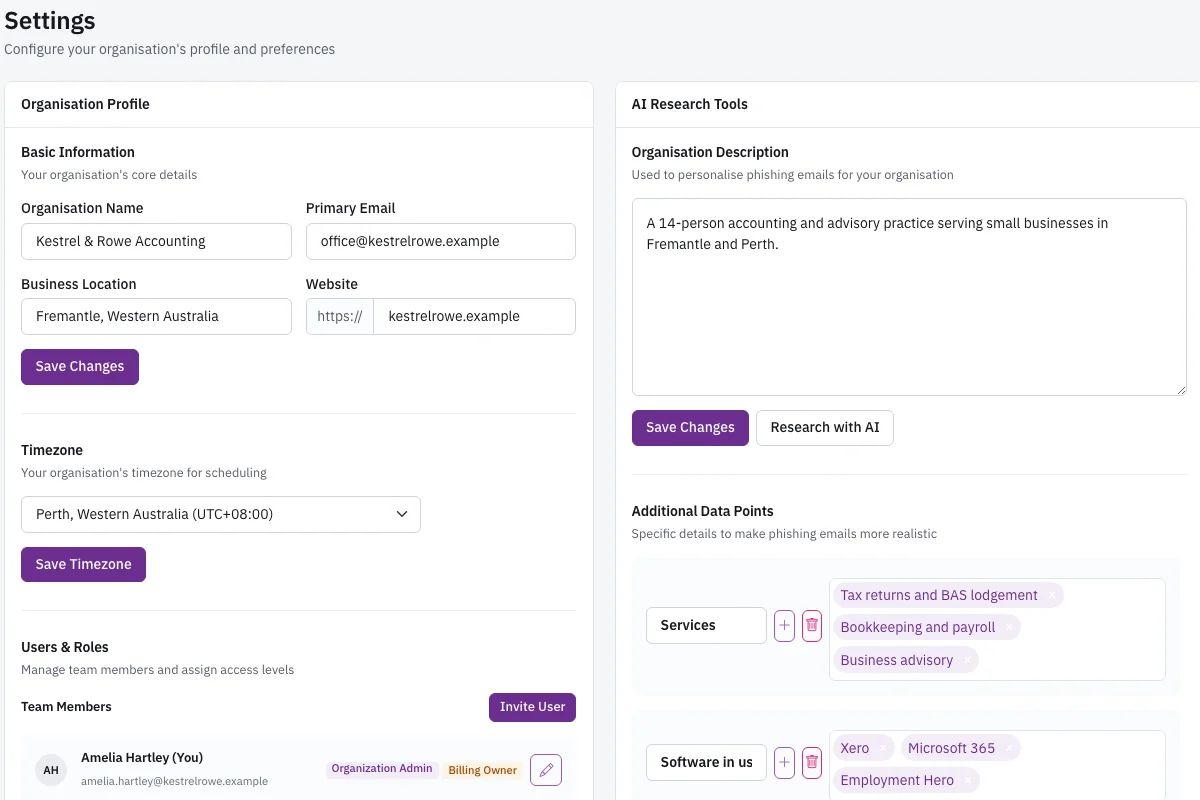
Settings page showing organization profile and an AI research panel with description, services, and software in use.

Organization Profile and AI Research

The settings page for each client shows the organization profile and an AI research panel. OutPhish researches the client's website and public web pages to build a profile of services, software the client uses, locations, and leadership. The panel displays this information for the MSP to review. You can edit the profile in settings at any time. AI output can be inaccurate, so the profile is always editable. This information helps the platform write more realistic simulated phishing emails based on each client's actual context. Employee names and addresses never reach the AI model. The AI provider does not use customer or staff data for training. Managed service providers control what gets saved in the profile. You can add or remove details before simulations run.

Campaign settings page with email frequency, training frequency, email platform, tone and maximum difficulty.

Campaign Settings Per Client

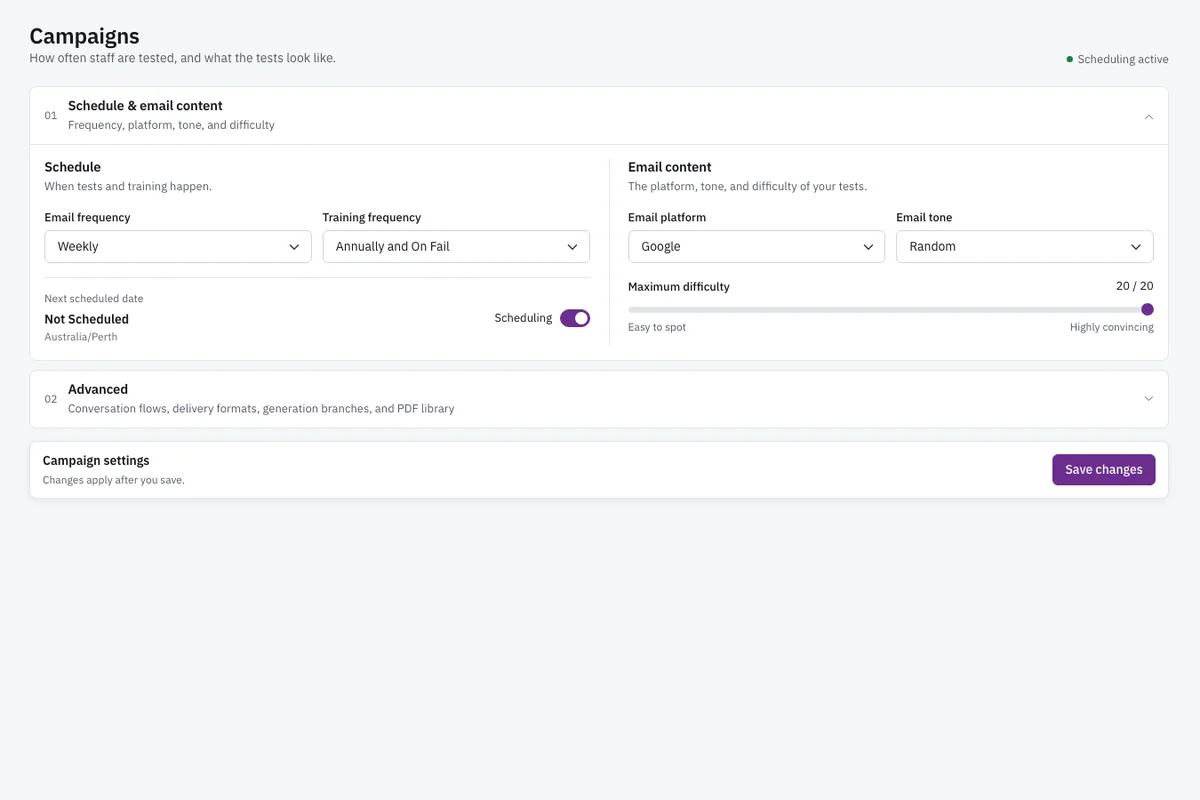
Campaign settings let an MSP control how phishing simulation and training behave for each client. You choose email frequency, for example weekly, and how often training is due, such as annually and after a failed test. You also choose which email platform the tests should look like, such as Microsoft 365 or Google, and set the tone. The maximum difficulty is set here. OutPhish then schedules each person's next test. Difficulty rises one step with each simulation up to that maximum. Difficulty decreases after a link click, then returns to baseline after someone submits a simulated sign in form. This screen gives managed service providers the controls to keep tests appropriate for each client. You can change these settings later without starting a new account.

Reports page with opens, clicks, compromised credentials, an interaction pie chart and a monthly trend chart.

Client Reports and Trends

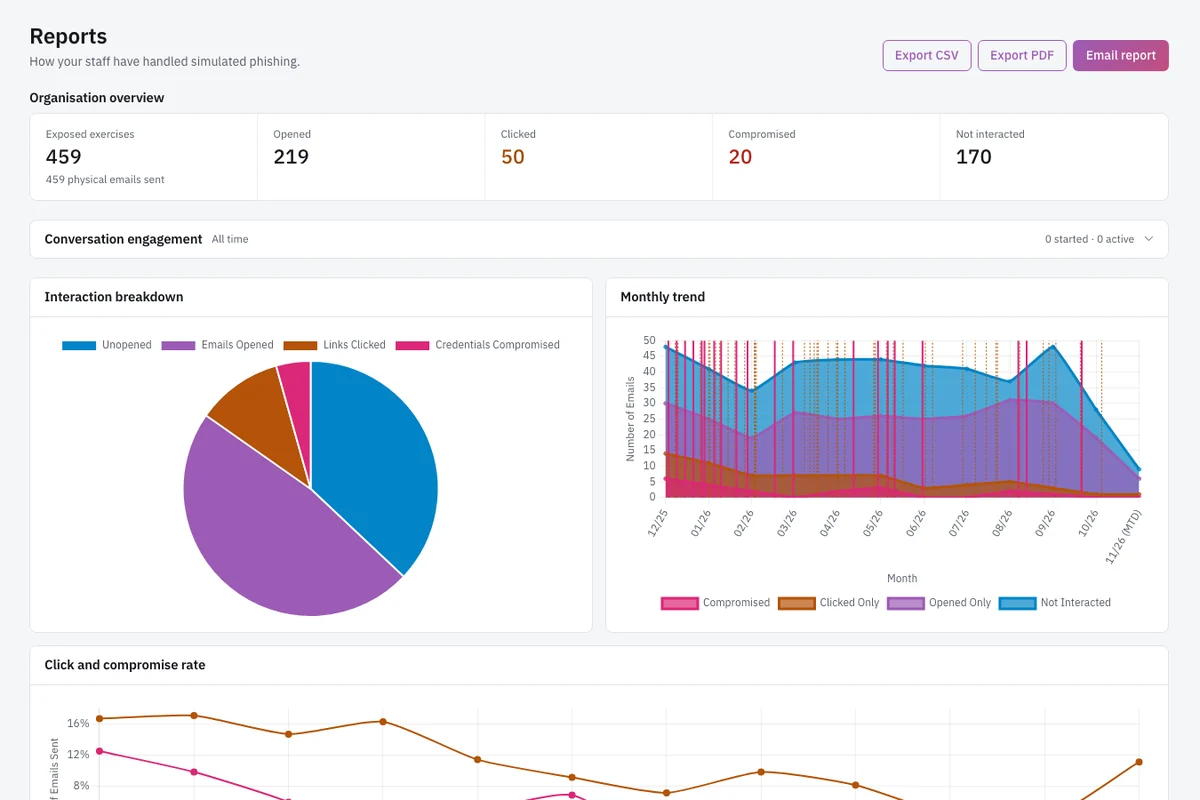
The reports page shows results for one client at a time. You see emails sent, opened, links clicked, credentials submitted, reported messages, and not interacted. An interaction pie chart shows how staff responded across a selected period. A monthly trend chart shows opens and clicks over time. These charts help an MSP spot shifts in client behavior after training. You can export the report to CSV or PDF and share it with the client. The page also lists people who need attention, which makes follow up easier. Reports are generated per client, so a managed service provider can give each organization its own record without exposing other clients' data. You can also email the report. The audit record can be downloaded for each staff member's simulations and training at any time.

A training completion email with a certificate of completion and the next training due date.

Training Completion Email

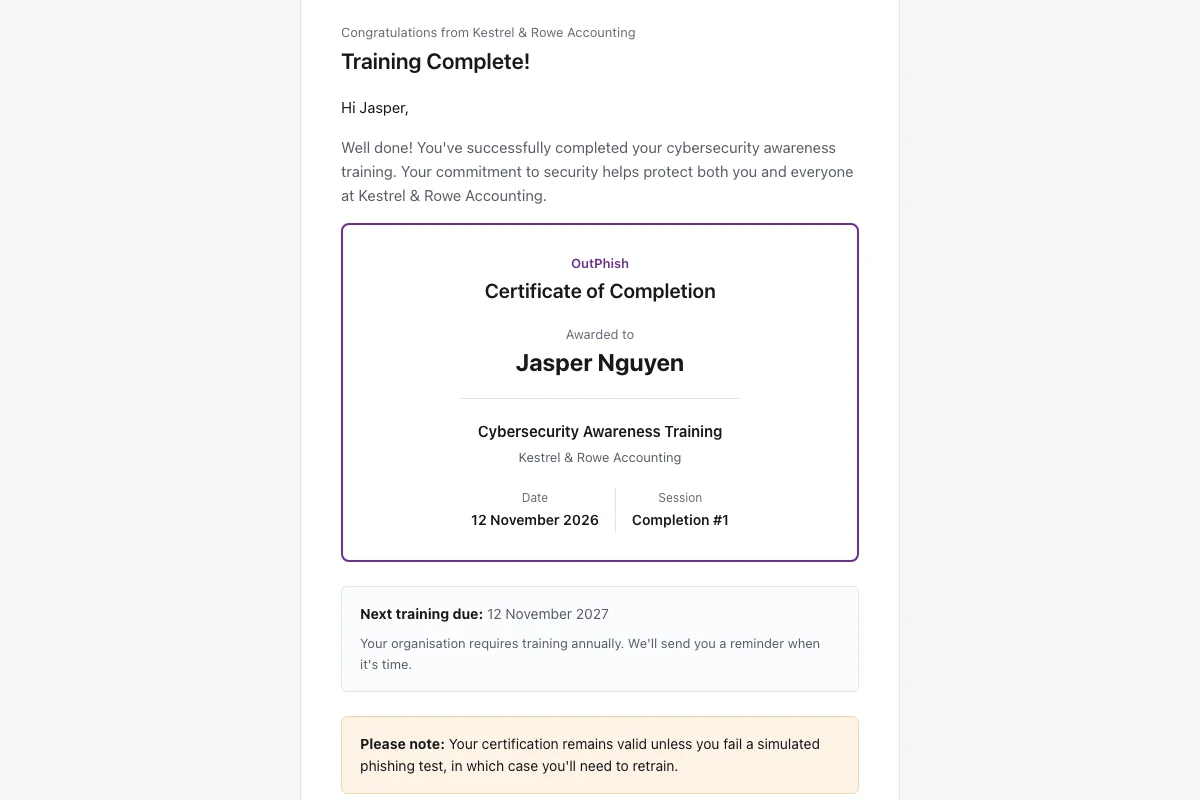
After a staff member completes the short security awareness training module, OutPhish sends a training completion email. That message provides a completion certificate and the next due date. For an MSP, this screen shows what the client's staff receives. The certificate is the record the staff member can keep. The next due date helps the person know when annual refresher training is due. If a staff member fails a simulation, the platform asks them to complete a short refresher. That refresher also generates a completion email with a new certificate. MSPs can use this email as evidence that training happened. You can send training reminders from the dashboard. The completion email is part of the campaign flow, not a separate manual step.

MSP Phishing Simulation in Detail

How do MSPs offer phishing simulation to clients?

An MSP offers phishing simulation to clients by using OutPhish in MSP mode. Managed service providers choose phishing simulation for MSPs when they want one plan for many client organizations. The approved provider signs up at app.outphish.com and requests MSP access. Once approved, the provider adds each client organization from one dashboard. Each client then has its own staff list, profile, campaign settings, and reports. The MSP can run simulated phishing emails for all of them on one plan.

To enroll a client, the MSP enters the client's organization name and email, website, location, and time zone. The MSP then imports staff or adds individuals. Each client gets whitelisting guidance from OutPhish so simulations reach inboxes. Client messages can carry the provider's brand while also naming OutPhish. No staff name or mailbox is shared with the AI model. OutPhish inserts names after the AI writes the text. The AI model writes each simulation using the client's organization profile and each staff member's job role. You can choose a tone and an email platform for each client. Platform choices include Microsoft 365 or Google. This lets the MSP add security awareness to managed services without juggling separate vendor accounts. For more on the core product, see security awareness training.

Can I manage phishing training for multiple clients from one account?

Yes, an approved MSP can manage phishing training for multiple clients from one OutPhish account. The portfolio dashboard shows every client with staff totals, messages sent, click rate, password entries, report status, training completion, overdue courses, and alerts. From there you can open any client workspace directly.

Each client's data stays separate. You will not see one blended report that mixes organizations. You can export per client to CSV or PDF. You can also download an audit record for each staff member's simulations and training. This supports sharing records with clients, insurers, or auditors. Reports are records you can keep and share.

Managed service providers can also use client level campaign settings. You may want weekly tests for one client and monthly tests for another. You can set that in each client profile. Training reminders can be sent per client. The dashboard does not require separate logins for every organization. For MSP pricing details, see pricing. For common questions, visit OutPhish FAQ.

How is MSP pricing for phishing simulation calculated?

MSP pricing is calculated on total staff across all clients under the provider's plan. The standard public prices are by staff count. The Free plan, with no card required, covers up to 15 staff members. The next tiers are US$19 a month for 16 to 25 staff, US$39 a month for 26 to 50 staff, and US$69 a month for 51 to 100 staff. Plans above 100 staff cost US$69 a month plus US$0.50 for each additional staff member. Yearly billing is 10 times the monthly price, so you get two months free. There is no setup fee. Ask support for partner rates if you manage many clients.

Because the plan is priced on total staff across all clients, you do not buy a separate plan for each client organization. The MSP pays for its clients' use under its plan. You can cancel any time. When you calculate cost, include all active staff across every client. Archived people do not count if you have removed them. Data location is in Sydney, Australia, but pricing is in US dollars. The platform and database are hosted there. Backup files are encrypted, and only OutPhish holds the decryption key.

Managing multiple clients also means managing whitelisting for each. If filters are not whitelisted, simulations may land in spam. That is outside OutPhish's control. The MSP should keep written agreements with each client current. The Customer Terms require that. If a client relationship ends, tell OutPhish promptly. Do not leave former clients in the dashboard.

What reports can I give clients?

You can give clients CSV or PDF reports that show opens, clicks, compromised credentials, an interaction pie chart, and a monthly trend chart. The reports page lists emails sent, opened, links clicked, credentials submitted, reported messages, and not interacted. You can email the report or download it per client.

Reports are per client. A managed service provider can share one organization's report without exposing other clients. Audit records are also available per staff member. The MSP can keep and share these records with insurers, auditors, or clients. You may also send client staff a training completion email with a certificate and next due date.

Set clear expectations with clients. Reports show how staff responded over time. Use them to identify who needs more training. You can also send training reminders from the dashboard. For business email compromise themes, see business email compromise training.

MSP Phishing Simulation Questions

An MSP needs a written agreement with each client that authorizes the provider to enroll the client's staff and share their data. The managed service provider also takes responsibility for that client's compliance with the plan terms. The MSP pays for the client's use under its own plan. OutPhish delivers phishing simulation for MSPs through a central dashboard. When a client relationship ends, notify OutPhish promptly. Before campaigns start, the MSP should complete whitelisting for the client domain. OutPhish provides a delivery guide. The MSP also needs the client's organization name, email, website, location, and time zone. Staff names and emails can be added one by one or imported by CSV.

Each client organization in the MSP dashboard has its own campaign settings. The managed service provider chooses email frequency, training frequency, platform style, tone, and maximum difficulty. For example, one client can receive weekly simulations that look like Microsoft 365, while another gets a calmer tone and lower difficulty. OutPhish sets the next delivery date for each person automatically. Difficulty rises one step with each simulation up to the maximum. After a link click, the difficulty goes down; after a form is submitted on a simulated sign in page, it resets. The MSP can open the client's settings at any time and change them without affecting other clients.

Yes, whitelisting applies to each client domain. The customer adds the delivery settings OutPhish provides so simulations reach inboxes. Email filters are outside OutPhish's control. A managed service provider should follow the whitelisting guide for every client organization. If a client has multiple domains, you may need to add the settings for each. Without proper whitelisting, simulated messages may go to spam or get blocked. There is no setup fee, but this step takes a few minutes per client. The MSP dashboard does not automate the client's email filter changes. Once whitelisting is done, test emails usually reach staff inboxes.

The AI research panel on each client's settings page shows a profile of the organization's services, software in use, locations, and leadership. OutPhish researches the client's website and other public web pages to build this profile. The managed service provider can review and edit the profile at any time. AI output can be inaccurate, so the profile is editable. The AI provider never sees person names or mailbox addresses. The platform adds those details after the model produces the message. The AI provider never trains on client or employee data. The profile helps the platform write realistic simulations based on each client's context.

Yes, client staff may see the MSP's brand alongside the OutPhish name in simulated messages. The managed service provider can decide how much of its own brand appears. This is part of the client campaign settings. The platform does not pretend to be the MSP's IT helpdesk without clear identification. The MSP should notify the client's employees that security awareness training includes simulated phishing. No staff names or email addresses go to the AI model. The OutPhish name also appears so recipients can distinguish the test from a real attack. You can learn more about the core product on security awareness training.

After a learner finishes a short module, OutPhish emails a certificate and the next required date. For MSP clients, the certificate goes to the staff member. The MSP can see completion in the client reports and can send training reminders. If a person fails a simulation, the platform asks them to complete a refresher. That refresher also produces a certificate. Training repeats each year and after any failed simulation. MSPs can download audit records per staff member and share those records with the client. Completion certificates are files the MSP and staff member can hold on to.

OutPhish pricing for phishing simulation for MSPs is based on total staff across all clients under the provider's plan. You do not pay a separate base fee for each client organization. Public pricing works by staff count. The free plan allows up to 15 staff with no card needed. Monthly prices then step up from US$19 for 16 to 25 people, US$39 for 26 to 50 people, and US$69 for 51 to 100 people. Above 100 people, add US$0.50 per extra staff member to the US$69 base. Pay yearly and the cost equals ten monthly payments, which gives two free months. There is no setup fee. Ask support at [email protected] for partner rates if you manage many clients.

Tell OutPhish promptly when a client relationship ends. The managed service provider should remove or archive the client's staff from the dashboard. OutPhish keeps each client's data separate, so ending one client does not affect other clients under the MSP plan. The MSP's written agreement with the client should define who receives final reports or audit records. You can export the client's reports to CSV or PDF before archiving. The MSP is responsible for paying for the client's use up to that point under its plan. Do not keep former client staff enrolled after the relationship ends.

An MSP can share per client reports in CSV or PDF format. The reports page shows emails sent, opened, links clicked, credentials submitted, reported messages, and not interacted. It includes an interaction pie chart and a monthly trend chart. You can share one client's report without exposing other clients. Audit records are available per staff member and can be shared with insurers, auditors, or clients. Reports track response changes over time. You can email the report from the dashboard. Managed service providers can also send a list of people who need attention to the client.

Yes, OutPhish offers an optional conversation style simulation where the simulated attacker replies to the staff member. A managed service provider can enable this for a client. The AI model writes each simulation using the organization profile and the person's job role. The AI model works without staff names or email addresses. OutPhish inserts names after the content is ready. Multi stage simulations can be more challenging than a single email. The maximum difficulty still applies. Administrators set the tone and email platform style for the client. You can review results in the client's reports page just like any other simulation.

To request partner rates, sign up at app.outphish.com and indicate that you are a managed service provider. The free plan supports up to 15 staff without a card. For larger groups, contact support at [email protected]. Public pricing starts at US$19 a month for 16 to 25 staff. Yearly payment equals ten monthly payments, which gives two free months. You pay no setup fee, and you can cancel any time. Partner pricing is calculated on total staff across all clients, not per client. OutPhish reviews MSP access before the dashboard is enabled.

MSP Phishing Simulation Ready for Your Clients

Start with the Free plan for up to 15 staff. Add clients, run tests, and share reports from one OutPhish dashboard.

Start free
Emailsupport [at] outphish [dot] com
Ask a question
Start free