Phishing Training for Nonprofits

Safe simulated phishing and short security training for nonprofits. Protect donor data, grant payments and volunteer email accounts with tests you control.

Phishing Training for Nonprofits

Practical protection for every nonprofit team

OutPhish provides Phishing Training for Nonprofits that suits a small paid team, a volunteer roster and a limited budget. Phishing Training for Nonprofits can protect donor data without a large budget. A nonprofit, charity or foundation keeps donor names, beneficiary records, grant letters and payment details in email. When a staff member or volunteer clicks a false link, that information may be exposed. Our phishing simulation software sends safe test emails and shows who needs more practice.

You can train everyone with email access, including part time staff and volunteers. The Free plan covers up to 15 people without a card. Larger teams pay by staff band. OutPhish helps a nonprofit build a calmer security routine without hiring new staff.

Phishing Training for Nonprofits

This page explains how OutPhish works for US charities, foundations and nonprofit teams that manage donor and beneficiary data. You will see how simulated emails, short security awareness training and reports fit into a tight schedule. The platform lets administrators set a test schedule, choose difficulty levels and add volunteers who use organization email.

  • Donor and beneficiary data stays safer when people practice spotting fake requests.
  • Grant and payment fraud tests include urgent transfer and gift card lures.
  • Executive impersonation simulations show how a public leader's name can be misused.
  • Volunteer email access can be included without extra cost per person under your plan.

Why do scammers target nonprofits?

Scammers target nonprofit organizations because those groups keep donor and beneficiary records, move grant and vendor payments, and often run with small teams. Leaders' names are public on websites and annual reports, so an email can easily pretend to be the executive director. A fake urgent payment or a gift card request may reach a part time employee who has not seen that pattern before.

OutPhish gives that staff member a safe way to practice. The platform sends simulated phishing emails, gives instant feedback after a click, and records results for administrators. You can view business email compromise training options for the finance and leadership patterns that hit charities hardest. For plan details, see pricing.

Benefits for Nonprofit Teams

OutPhish gives charities and foundations a simple way to test staff and volunteers without straining the budget.

Tests for Paid Staff and Volunteers

Add anyone with an organization email, including part-time staff and volunteers.

Safe Fake Emails

Simulated messages show realistic donor, grant and payment requests without real danger.

Short Refresher Courses

People who click get immediate feedback and a short training module.

Leader and Payment Scam Practice

Tests cover gift card requests, fake payments and executive impersonation attempts.

Simple Reports

See opens, clicks and compromised credentials by person and over time.

Free Plan for Up to 15

Start with the Free plan; no card needed for small nonprofit teams.

How a Nonprofit Moves Through OutPhish

Each screen supports a small team, from sign-up to a clear report on donor and payment risks.

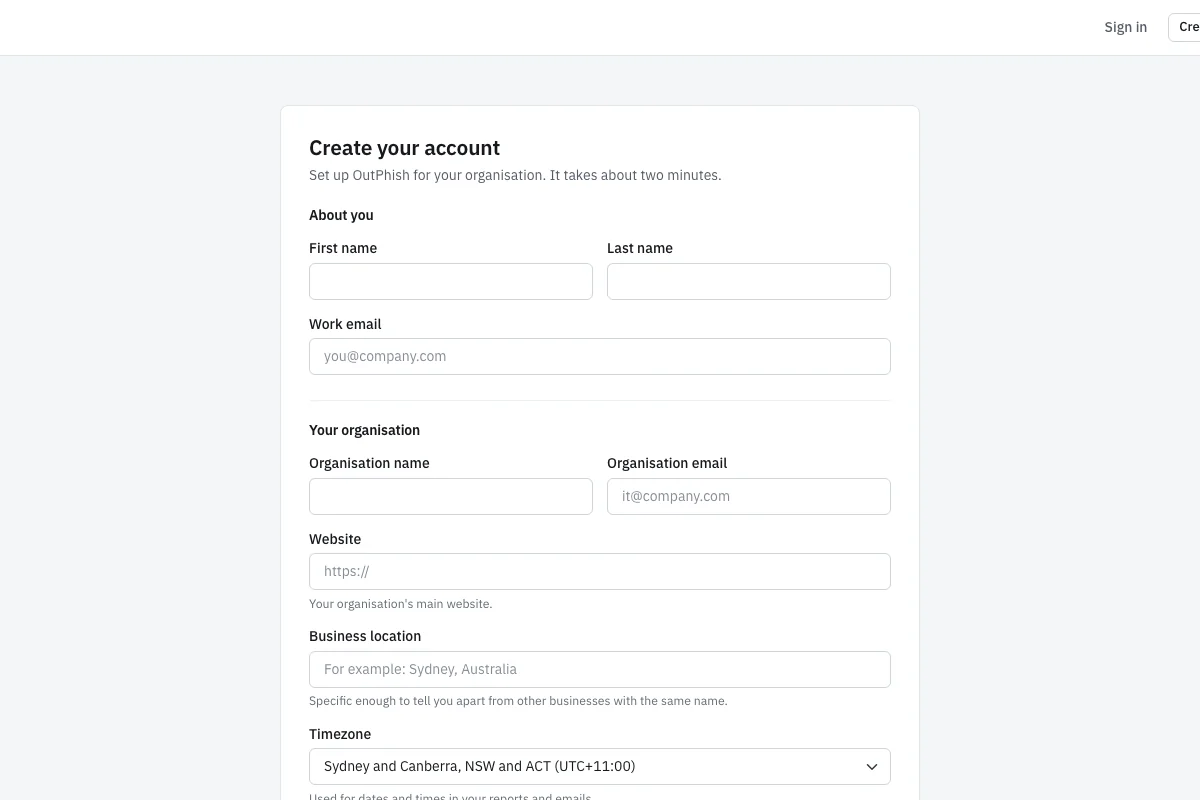
OutPhish sign-up form showing name, work email, organization name and email, website, business location and time zone fi

Create your OutPhish account

The sign-up form asks for your name, work email, organization name, organization email, website, business location and time zone. This information helps OutPhish build an AI organization profile from public web pages. You can review and edit the profile later in settings, so any incorrect AI output does not stay in place. The form is online at app.outphish.com. Organizations with up to 15 staff can use the Free plan without a card. After sign-up you choose the email platform style, such as Microsoft 365 or Google, and set a simulation schedule. You also add the whitelisting settings so test emails reach inboxes. The setup takes a few minutes but does require those delivery steps.

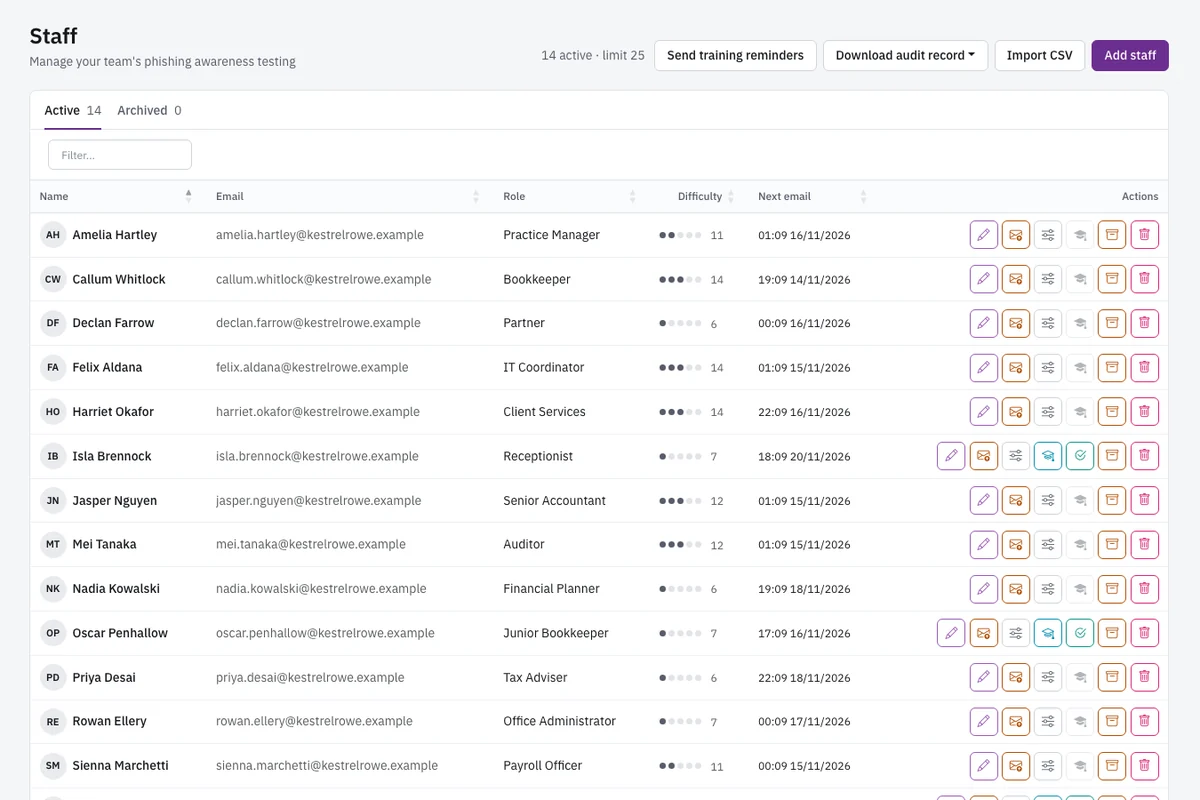
Staff list screen with role, current difficulty level and next scheduled test for each person

Add staff and assign roles

The staff list shows each person's name, role, current difficulty level and next scheduled test. Nonprofits can add employees one at a time or import a CSV file. You can also add volunteers with organization email, and those helpers go through the same tests and lessons as employees. Administrators choose the difficulty range and how often tests go out. After a clean test, that person's assigned level moves up one notch, limited by the top you set. It goes down when they click a link, and returns to the base level if they submit a form. The list also lets you archive people who leave. This screen is where a charity manager can keep the roster current without extra IT support.

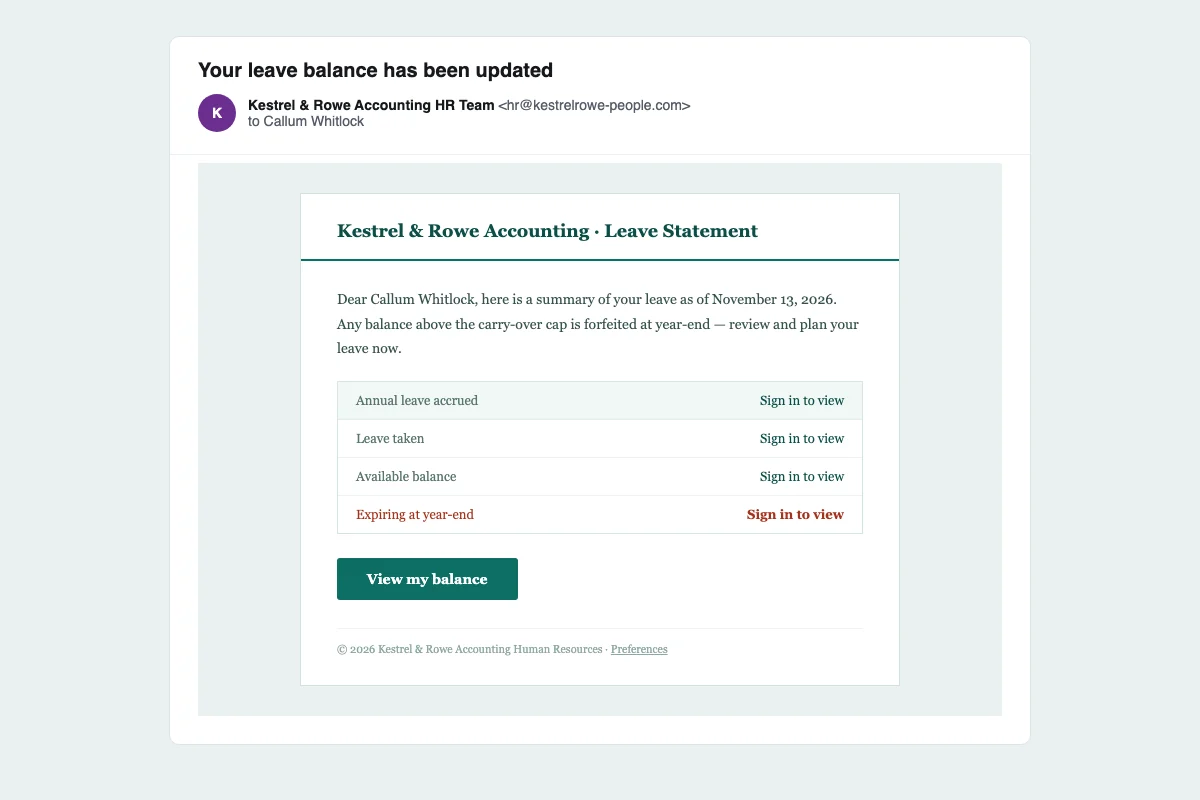
Simulated HR email saying a leave balance has been updated, with a link to click

Run an HR leave balance test

This simulated email appears to come from the HR team and says the reader's leave balance has been updated. The message includes a link, just like a real internal notice might. OutPhish writes each simulation from the organization profile plus the person's role. The AI model never sees staff names or email addresses. OutPhish adds those details after the message is written. You can choose whether the test looks like Microsoft 365 or Google and set the tone. A nonprofit employee who sees this message can practice checking the sender, the link and the request before acting. If they click, the platform records it and sends feedback.

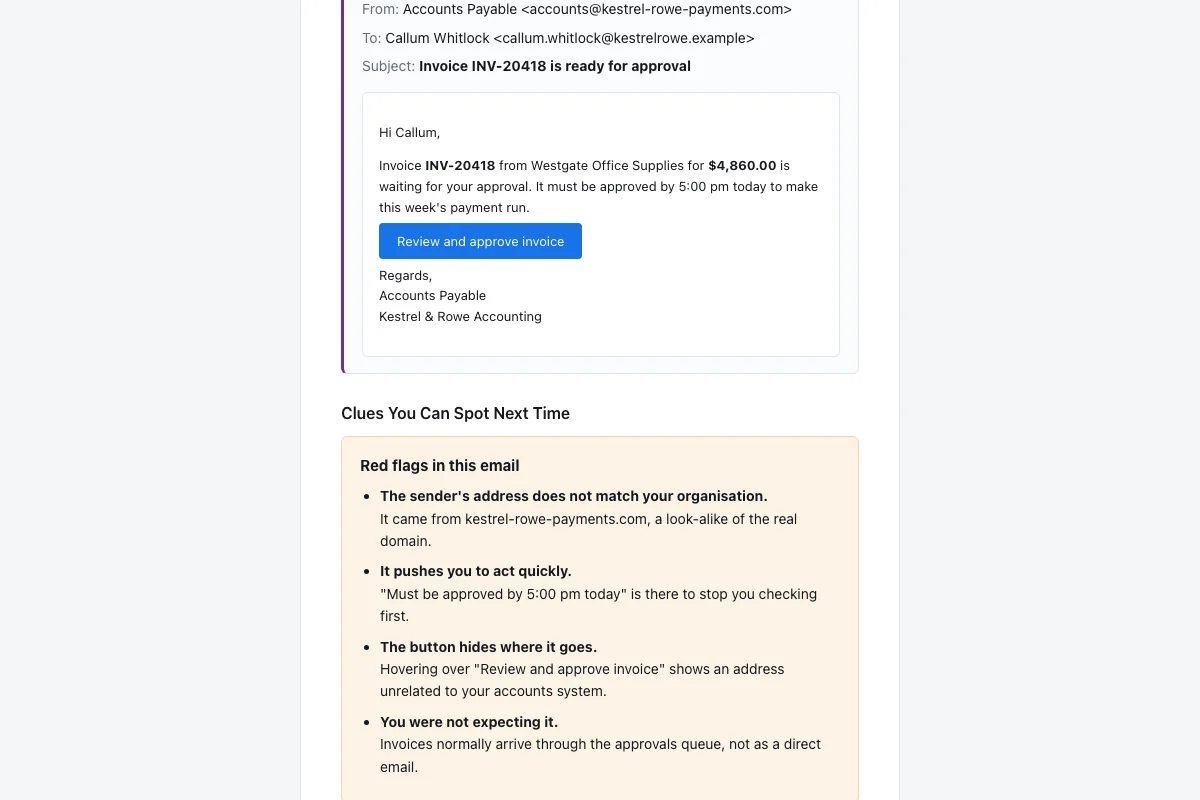
Feedback email showing the simulated HR message again and a list of missed red flags

Show the missed red flags

The feedback email appears right after a click. The message appears again with a list of the red flags the person overlooked. That helps a volunteer or employee see the exact clues in the message instead of only learning a general rule. Quick tips follow, and the person is asked to complete a short refresher module. No passwords are collected. If a person enters text on a fake sign-in screen, the system notes only that the form was sent. It never keeps what they typed. Administrators can see who clicked and who submitted a form. This screen turns a mistake into a private teaching moment for the staff member.

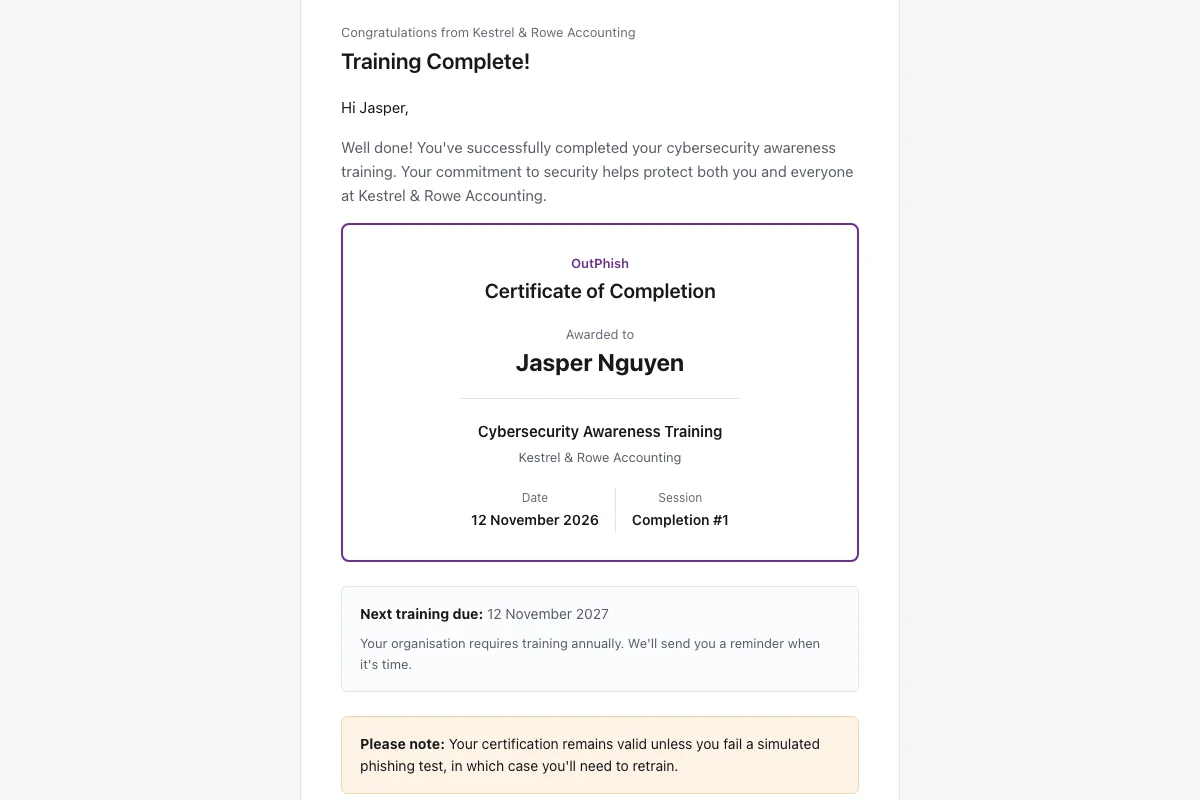
Training completion email with a certificate of completion and the next training due date

Complete training and get a certificate

The training completion email confirms that the person finished a short security awareness module and includes a certificate of completion. It also shows the next training due date. People repeat training once a year and after any failed test, so a nonprofit keeps a regular rhythm without scheduling every session by hand. Administrators can send training reminders. Staff and volunteers get the same certificate record, which is useful if a foundation wants simple proof of participation. Completion records show in reports and can be exported if you need to share them with an auditor or insurer. The email gives a clear next step after any click.

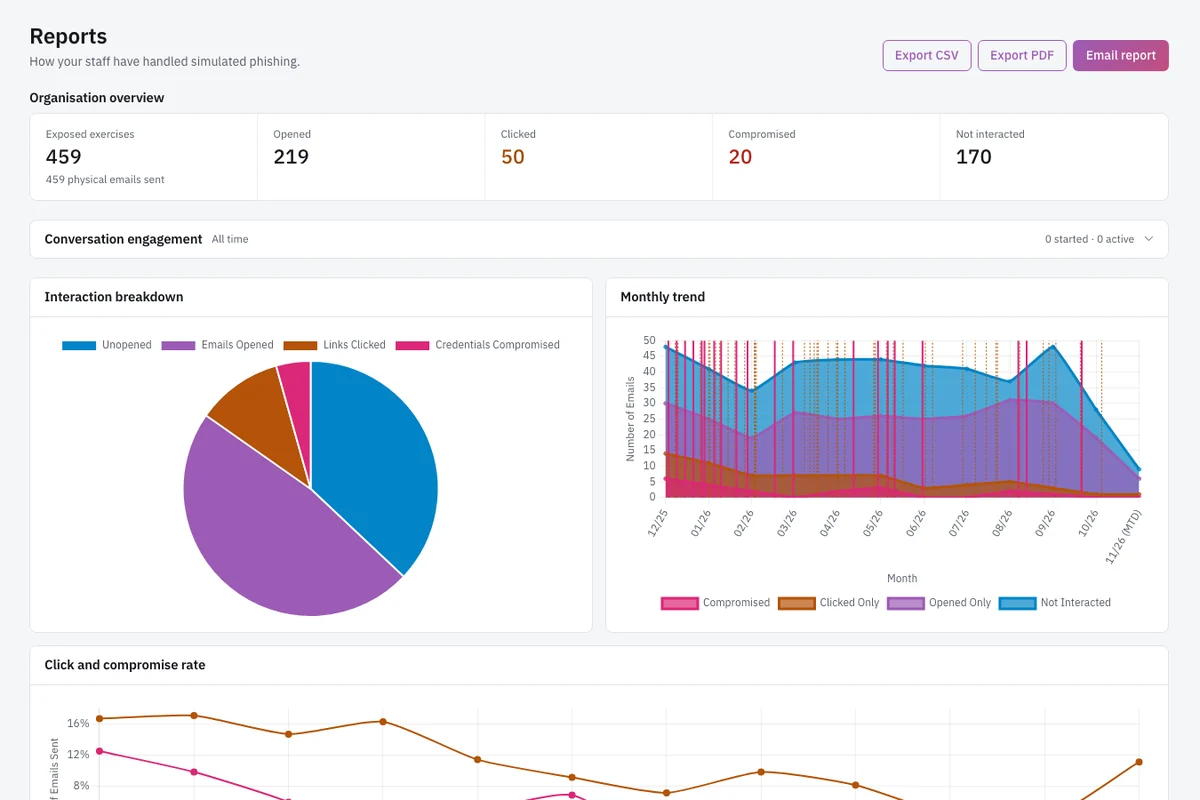
Reports page with opens, clicks, compromised credentials, interaction pie chart and monthly trend chart

Read the reports page

The reports page shows emails sent, opened, links clicked, compromised credentials, reported messages and interactions not made. It includes an interaction pie chart and a monthly trend chart, so a nonprofit leader can see how click and compromise rates change over time. Reports also list people who need attention, which helps a small team decide who should repeat training. You can export the data to CSV or PDF, or email the report. An audit record of each person's simulations and training can be downloaded at any time. You can keep and share these records with auditors, insurers or clients. The page gives a plain view of the whole staff roster.

Rules and practical habits for nonprofit security

How can a nonprofit train volunteers on phishing?

For volunteer training, create staff records for helpers who use organization email. They then receive the same simulated phishing emails and short training modules as paid employees. A charity often has part time helpers opening donor messages, so this group needs practice too. You can import a CSV file or add people one at a time. Set a difficulty maximum and a schedule that suits their hours. Short training modules and instant feedback after a click fit a volunteer's limited time.

Tell volunteers that the nonprofit runs security awareness training that includes simulated phishing. They should treat every unexpected request for donor lists, gift cards or payment changes as something to confirm. Volunteers can follow three habits. First, check the sender address behind the display name. Second, hover over links before clicking. Third, report the message to the designated staff person instead of replying.

  • Add volunteers to the staff list with their organization email address.
  • Start each volunteer at a low difficulty level and let it rise after clean simulations.
  • Ask volunteers to complete the short refresher after any click.
  • Send training reminders before a campaign or grant season.

This routine keeps the whole nonprofit roster visible in one place. It also gives administrators a record of volunteer training without putting sensitive data in a separate spreadsheet.

What data breach rules apply to nonprofits?

Notification rules differ by state, so a nonprofit should check each state where its donors and clients live. A small foundation may have obligations in more than one state even if it operates from one office.

You can download an audit record of each person's simulations and training at any time. You can keep and share these records with insurers, auditors or clients. The platform and database are hosted in Sydney, Australia, and personal information leaves that hosting only as described in the Privacy Policy. Keep your own breach notification checklist with your state rules and contact details.

Practical habits help. Know which systems hold donor and beneficiary personal data. Restrict email access to people who need it. Archive staff and volunteers who leave. Run regular simulated phishing so you can see who needs more training before a real message lands.

  • List donor and client information by state so you know which breach laws may apply.
  • Keep an incident contact list for your nonprofit, your state regulator and your outside counsel.
  • Review breach notice deadlines before an incident happens.
  • Download audit records after each training cycle and store them with your other risk documents.

Is there free phishing training for nonprofits?

OutPhish offers a Free plan that covers up to 15 staff with no card needed. Beyond 15 people, the monthly cost follows staff size. For 16 to 25 staff the cost is US$19 a month. For 26 to 50 staff the cost is US$39 a month. For 51 to 100 staff the cost is US$69 a month. There is no setup fee, and a small nonprofit can start with the Free plan and no card.

Start with the staff who handle payments, donor data or grant applications. Add volunteers who use organization email. Choose a schedule, such as weekly tests, and set training due annually and after a failed test. You can view the full phishing simulation and training platform details or read the OutPhish FAQ for delivery questions.

On the Free plan, you get the full platform for up to 15 staff. That includes AI-written simulations, instant feedback, training modules, reporting and the audit record. You do not need to enter a card. OutPhish decides when to offer the Free plan, so a nonprofit should check the current terms before relying on it over time.

How should a nonprofit handle fake grant and vendor payment requests?

Treat an unexpected grant or vendor payment change as suspicious until you confirm it by phone with a known number. Scammers target charities with fake grant and vendor payment requests because leaders' names and giving relationships are often public. A message may look like it comes from the executive director and ask for gift cards or an urgent transfer.

OutPhish can send simulated emails in the same style, such as a fake invoice update. The platform records opens, clicks and form submissions so you can see which roles need support. Create a payment rule for your finance team: no one approves a new bank account or large payment from an email alone. For donation platforms, go to the website directly instead of clicking an emailed login link. Use a password manager if possible.

Phishing Training for Nonprofits works best when a nonprofit pairs tests with a short written policy. Write down who can approve payments, how to check a request and where to report phishing. Review that policy with new staff and volunteers. Then run simulations that reflect your real workflows.

Practical habits also help. Share one known phone number for urgent payment confirmations. Keep a list of current vendors and grant contacts. If a message asks for secrecy, stop and report it. These small rules protect donor funds and beneficiary data.
Phishing Training for Nonprofits: Questions and Answers

Attackers go after nonprofits because those groups keep donor and beneficiary records, move grant and vendor payments, and often have small teams. A charity or foundation also publishes leader names in annual reports, so attackers can impersonate the executive director. Volunteers and part time staff with email access may not have seen those fraud patterns before. Simulated phishing helps a nonprofit practice real lures without putting money or data at risk.

A nonprofit can add a volunteer to OutPhish as a staff member with their organization email address. That person then receives the same simulations and training as employees, with no separate system. You can bring people in through a CSV import or enter them individually. Set a low starting difficulty and schedule tests around their hours. Short refresher modules fit a volunteer's limited time. After a click, the volunteer gets immediate feedback and a list of missed red flags. That turns a mistake into a learning step. Administrators can send training reminders and view completion records.

Yes, the Free plan covers up to 15 staff and requires no card. OutPhish can offer the Free plan only when it chooses. It includes the full platform. After 15 people, the cost changes by staff size. For 16 to 25 staff, it costs US$19 a month. For 26 to 50 staff, it costs US$39 a month. For 51 to 100 staff, it costs US$69 a month. There is no setup fee. A nonprofit can start with the Free plan and add paid staff as it grows.

A nonprofit should look at the breach notification law in every state where its donors and clients live. Rules differ by state. A small charity may need to follow several states even if it runs from one office. Keep a list of donor and beneficiary data by state and know who to contact after an incident. You can download OutPhish audit records to show training history, and you can keep and share those records with insurers or auditors.

Check the sender address behind the leader's display name. Call the executive on a known phone number if the request involves gift cards or a payment. Watch for urgent language and secrecy. Scammers use public details from websites and annual reports to make the message look real. A simulated test from OutPhish can imitate that same pattern so staff practice the right response. Do not reply to the suspicious email or use any contact details in the message.

Yes, a small charity can run OutPhish with a staff member acting as administrator. Setup takes a few minutes and includes whitelisting steps to help emails reach inboxes. You do not need dedicated security staff. The AI organization profile researches public web pages, and you can review and edit it in settings if the AI output is inaccurate. Names and email addresses of your people never go into the AI writing model. Administrators can add people, choose a schedule and read reports from one screen.

The volunteer receives a feedback email immediately. The message appears again with the clues the person overlooked. Quick tips follow, and the email asks for a short refresher module. No one is singled out publicly. The platform records the click and, if they submitted a form, only that the form was sent. Any characters entered are not kept. Administrators see the result in the per-person reports and can send a reminder if needed.

Administrators choose the frequency. A weekly schedule works for many charities, but any regular pattern helps. Training is due annually and after a failed simulation. After a clean simulation, the assigned level moves up one place, but only to the top limit you choose. It falls after a link click. It returns to the base if the person sends a form on a fake sign-in screen. The schedule stays flexible so you can slow down during a campaign or audit period.

No. Whatever they type there is never kept; only the submission itself is ever logged. It never keeps the characters. Staff names and email addresses are kept out of the AI writing model. Customer and staff details are never used to train the provider's models. This makes the platform a safe place to practice the moment before a credential handover.

OutPhish reports are records you can keep and share with insurers, auditors or clients. They show each person's simulations, clicks, form submissions and training completion over time. You can export to CSV or PDF, email the report, or download an audit record at any time. A foundation can use the records to demonstrate a regular training routine and to decide who needs more help.

Put each volunteer into the staff list using their official email address. You can enter people one by one or use a CSV import. When someone leaves, archive them in the staff list. Archived people stop receiving scheduled simulations and training. The record keeps their past results for audit purposes. This helps a nonprofit keep the roster current and avoids sending test emails to accounts that no one reads.

A short policy should say who can approve payments, how to check payment or grant requests, and where to report phishing. Tell staff and volunteers that the nonprofit runs security awareness training that includes simulated phishing. Add a rule that no one approves a new bank account or large payment from an email alone. For donation sites, open the site directly rather than using the link in the email. Review the policy with new people and pair it with simulated emails that reflect real workflows.

Start Phishing Training for Nonprofits Today

Add up to 15 staff and volunteers free. Set up in a few minutes and run your first simulated email.

Start free
Emailsupport [at] outphish [dot] com
Ask a question
Start free