Phishing Training for Accounting Firms

Simulated phishing and short security training for CPA firms, tax preparers, and bookkeepers who handle client data during tax season.

Phishing Training for Accounting Firms

For accounting firms that handle client data

Tax preparers, CPA firms, and bookkeepers face the same pressure each spring. The work speeds up, clients send documents by email, and one wrong click can expose client data. OutPhish offers phishing training for accounting firms that fits the way your practice actually works. The platform sends simulated phishing emails to your staff and records how each person responds. When someone clicks, they get instant feedback and a short security training refresher. This gives your accounting firm a clear record of who needs more practice.

You can use this with security awareness training for the whole team. The phishing simulation software lets you run tests that look like Microsoft 365 or Google email. You choose the schedule and difficulty. A phishing simulation and training plan can cover partners, preparers, bookkeepers, and admin staff. Pricing starts with a Free plan for 1 to 15 staff, so a small CPA firm can test the platform without a card.

What Does Phishing Training for Accounting Firms Include?

This page covers tax season scams, client data protection, and the rules that affect tax preparers. OutPhish helps your firm run fake phishing emails that imitate the messages your staff already see. Administrators get a dashboard that shows opened messages, clicked links, submitted forms on simulated sign-in pages, and reported tests. You can enter staff individually or bring in a list through a CSV upload. You can also set training due dates for every role.

  • Simulated IRS and client emails: Tests can mimic common tax season requests without using real client data.
  • Instant feedback: A click triggers a training email that shows the red flags in that message.
  • Per person reports: CPA practices can see who clicked, who reported, and who needs help.

How Can Accounting Firms Protect Client Data?

Accounting firms can protect client data by training every person who handles email, tax software, or client files. The IRS expects tax and accounting professionals to have a written information security plan, often called a WISP. Your firm can keep OutPhish per person training and simulation records alongside that plan and share them with advisers or auditors.

Start with a few simple habits. Separate personal email from firm email. Confirm any change to refund or payment details by phone or in person. Use a password manager for tax software portals. Review your AI research profile in OutPhish so the simulations reflect the services your firm actually provides. You can use pricing to see plan sizes, or read the OutPhish FAQ for setup and whitelisting details.

Why accounting firms run phishing simulations

See what your CPA firm, tax preparers, and bookkeepers do when a tax season email asks for action.

Tax season scam practice

Help staff spot IRS and client email scams before they click.

Fake emails that match your firm

Simulations use your services, software, and staff roles.

Training for partners and preparers

Assign the right difficulty to every role in your accounting firm.

Feedback after a miss

Anyone who clicks gets red flags and a quick refresher.

See who needs attention

Reports list clicked, reported, and submitted form results per person.

Records to share

Download simulation and training records for insurers, auditors, or clients.

How OutPhish works for accounting firms

Six views show setup, a simulated invoice, feedback, training completion, and per person reporting.

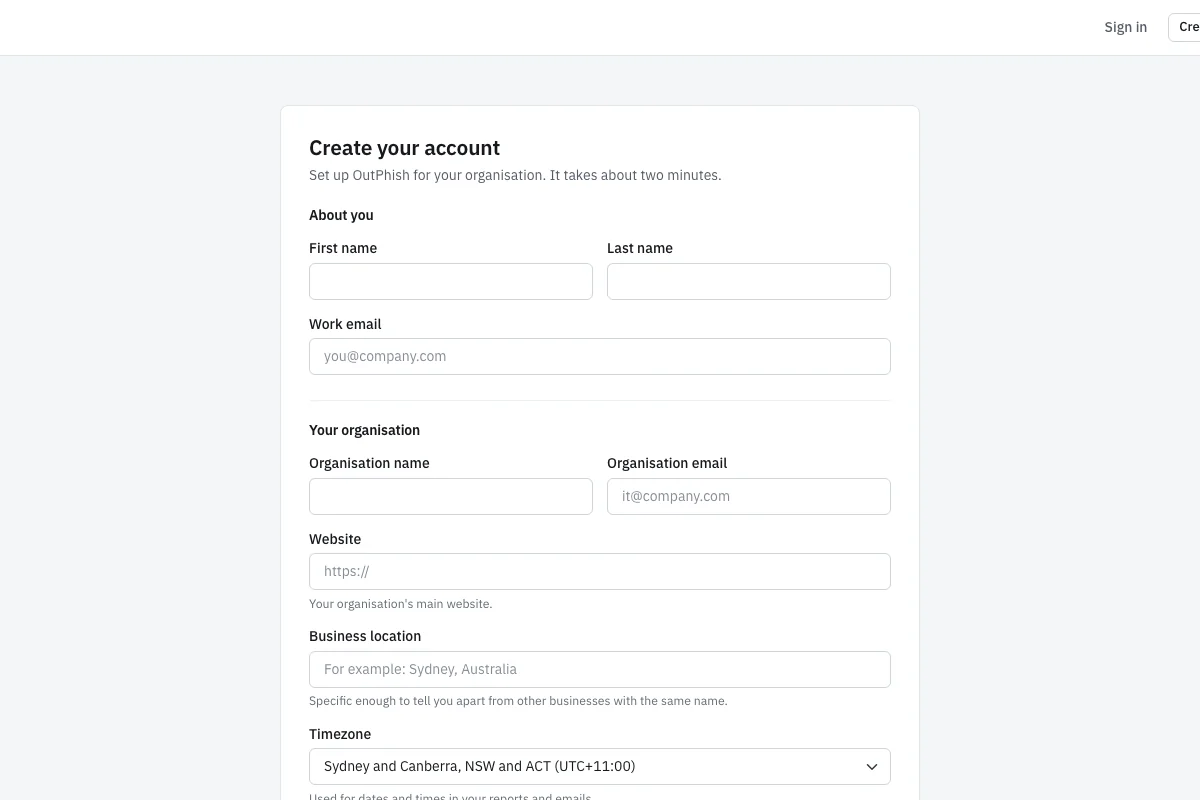
Signup form with fields for name, work email, organization name and email, website, business location, and time zone.

Start with your firm's signup form

Set up an account at app.outphish.com. The signup screen asks for your name, work email, organization name and email, website, business location, and time zone. The business location and time zone help OutPhish schedule tests during your working hours. Your website is used by the AI research step to learn how your accounting firm describes its services. No card is needed for the Free plan. After you complete this form, you can add staff one by one or import a CSV file. The signup form keeps the initial setup simple, but you can edit your organization profile later. Start with the smallest team, such as partners and tax preparers who handle client email.

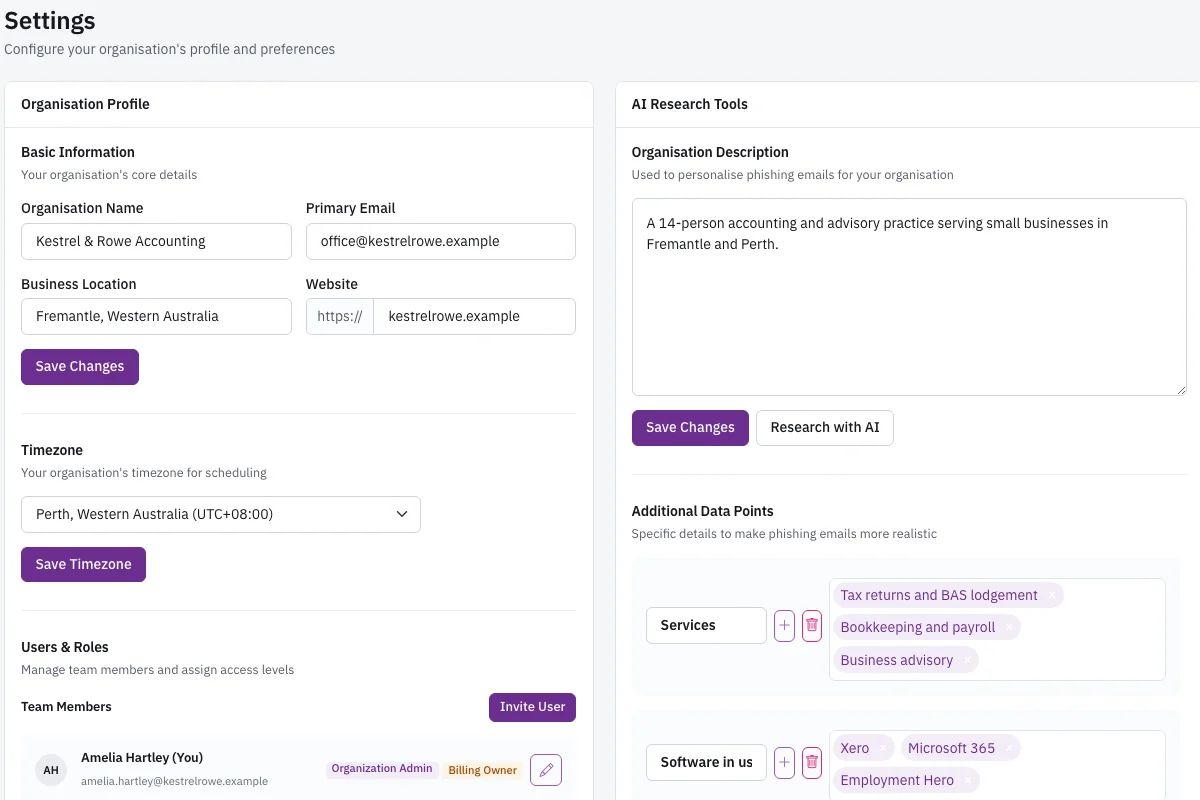
Settings page showing organization profile fields and an AI research panel for services and software in use.

Review the AI research profile

The settings page shows your organization profile and an AI research panel. OutPhish can research your website and public web pages to suggest a description, your services, the software your firm uses, your locations, and your leadership. The AI output can be inaccurate, so you can review and edit every field. Keeping this profile accurate matters because future simulations use it to create realistic messages. A CPA firm that lists tax prep software and a bookkeeper role will receive different tests than a firm that lists audit services. You can also choose whether tests should look like Microsoft 365 or Google email, and set your preferred tone. This is where your accounting firm shapes the training content.

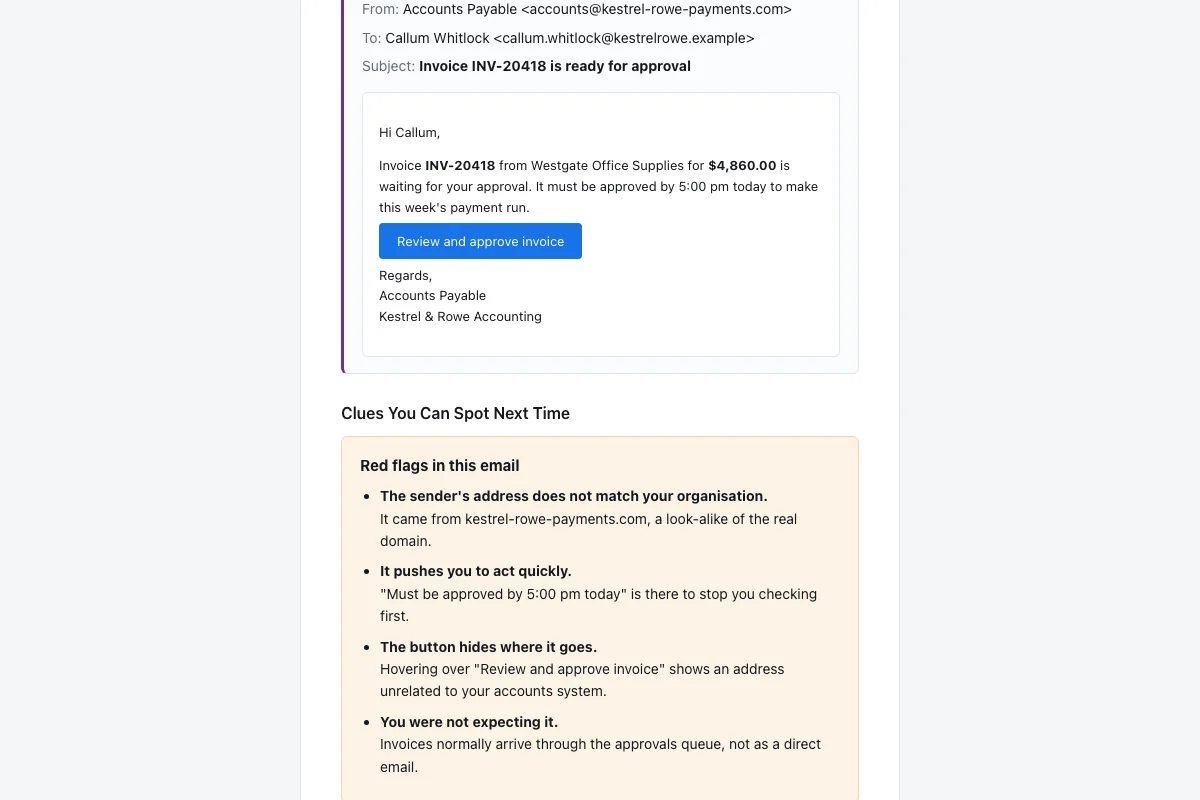
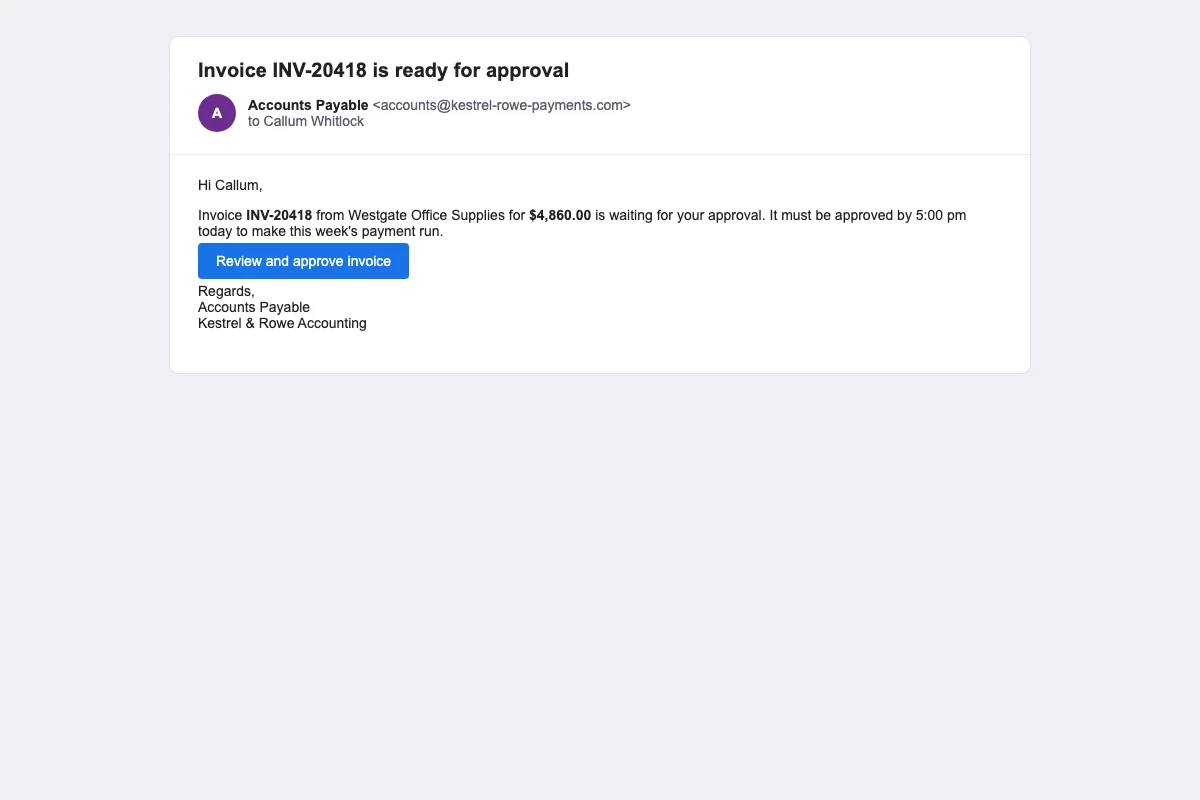
Simulated email from Accounts Payable asking the reader to approve an invoice before 5 pm.

See a simulated invoice request

This screen shows a simulated email from Accounts Payable with a subject about an invoice that needs approval before 5 pm. The message is written by an AI model using your organization profile and the staff member's role. It may ask the reader to click a link. The model never receives personal names or addresses. OutPhish adds the recipient's name after the text is ready. If a tax preparer receives this during tax season, the timing makes it feel more realistic. The email is a test. A careful reader can report it or ignore it. A distracted reader can click and learn from the next screen.

Feedback email after a click showing the simulated email again and a list of red flags that were missed.

Open the click feedback email

When someone clicks the link in the simulated invoice, the platform sends an instant feedback email. This screen shows the simulated email again and a list of red flags that were missed. The list may explain the urgent deadline, the unexpected sender, or the mismatch between the display name and the reply address. The feedback email then asks the person to complete a short training refresher. This step helps a bookkeeper or tax preparer connect the mistake to a specific habit. It is not meant to shame anyone. The feedback email appears right after a click, so the lesson lands while the message is still front of mind.

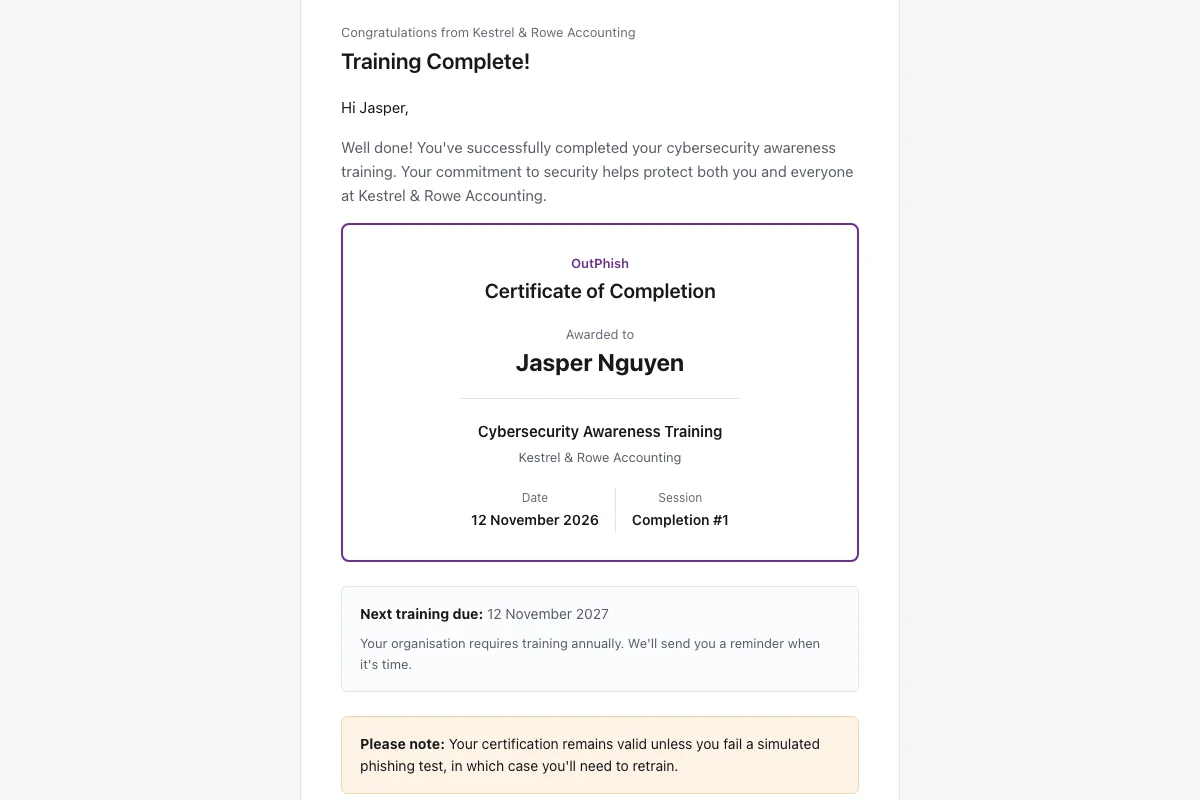
Training completion email with a certificate of completion and the next training due date.

Complete the training refresher

This screen shows a training completion email with a certificate of completion and the next training due date. A staff member who finishes a module receives this email as a record. The certificate includes the person's name and the date. The next due date is based on your settings, such as annually or after a failed simulation. This email can be saved or forwarded to an administrator. For an accounting firm, these completion emails are records you can keep with your written information security plan.

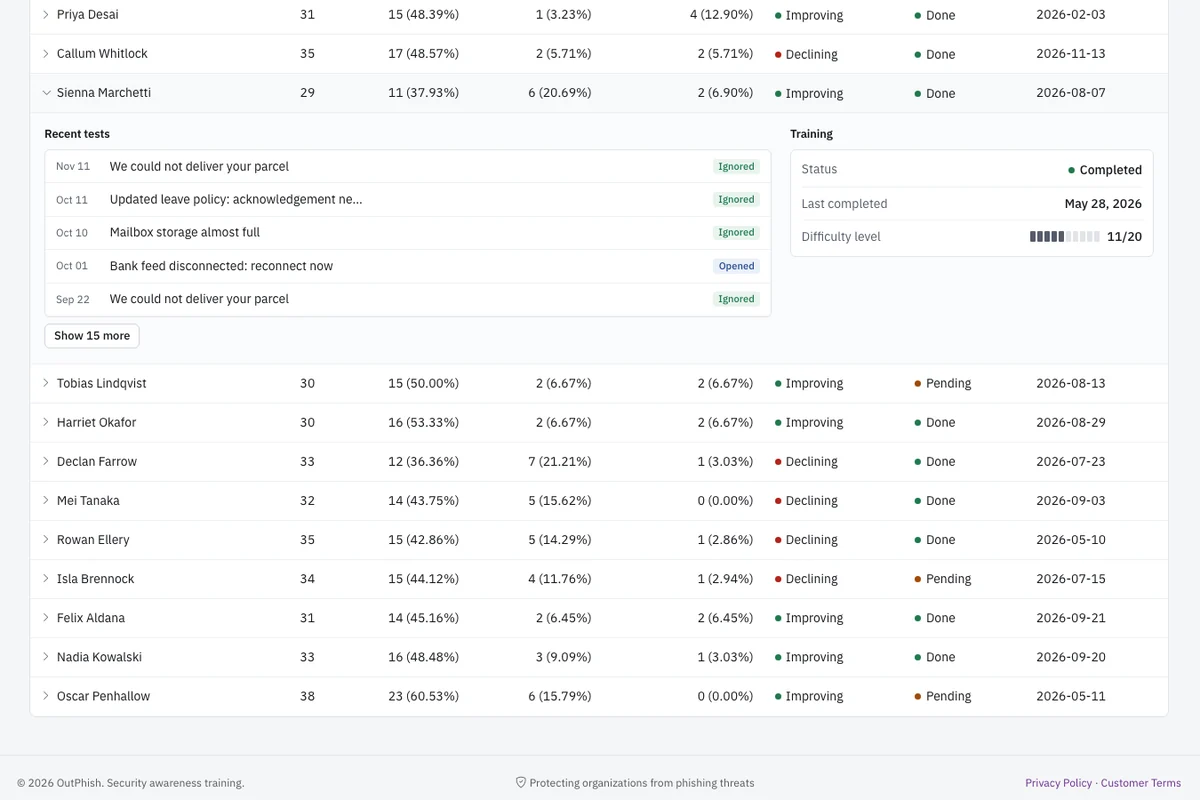
One employee's recent tests and outcomes showing training status and current difficulty level.

Check one employee's recent tests

This screen shows one employee's recent tests and outcomes, with training status and current difficulty level. You can see emails sent, opened, links clicked, forms submitted on simulated pages, reported, and not interacted. The difficulty level rises one step with each simulation and falls when the person clicks a link. A form submission on a fake sign-in page moves the difficulty back to the starting level. Training status shows what is complete, due, or overdue. An administrator at a CPA firm can use this screen to decide who needs a reminder or extra practice. The per person view turns broad testing into a clear coaching list.

Security rules and habits for accounting firms

Does the FTC Safeguards Rule require security awareness training for accounting firms?

Yes, for covered accounting firms, the FTC Safeguards Rule can require security awareness training. Many tax preparation firms fall under this rule because they are treated as financial institutions for this purpose. Section 314.4(e) requires covered businesses to train all personnel on security awareness. The training must be updated to reflect risks found in your risk assessment. Information security staff also need additional training.

Your firm should confirm with its own advisers whether and how the rule applies to your services. OutPhish provides phishing training for accounting firms with simulations that mirror tax season requests. The platform keeps per person records that an accounting firm can share with an adviser or auditor. Pair those records with your own risk assessment and written program decisions.

For a CPA firm, the first step is to read the rule language and map it to your own services. The rule does not prescribe one exact training vendor. It calls for a behavior change program that fits your risks. A tax practice that uses client portals and email may decide that monthly simulations are appropriate. A small bookkeeping firm may choose less frequent tests. The key is that training is not a one time event.

OutPhish lets an administrator set a maximum difficulty level. Difficulty rises with each successful simulation. A click lowers the difficulty, and a fake sign-in form submission returns it to the base level. That progression gives you evidence that staff are being challenged at the right level.

Do tax preparers need a written information security plan?

Yes, the IRS points to federal law that calls for tax and accounting professionals to keep a written information security plan. Many firms call this a WISP. IRS Publication 5708 gives tax and accounting practices a WISP template. The August 2024 revision treats staff management and training as one of its core areas and suggests signed acknowledgments as part of the record.

For a small or midsize tax preparer, a WISP can feel like paperwork. It is easier to maintain when your security training system keeps an audit record. OutPhish can store each person's simulation results and training completion. You can download those records and keep them with your WISP, or share them with an adviser.

IRS Publication 5708 includes several sections for a reason. It wants tax pros to name who is responsible for security, identify risks, train staff, and plan for incidents. A written plan that sits in a drawer does not help if a preparer clicks a refund change request. You need live practice. Simulated phishing from OutPhish can be one item in the employee management and training section.

For each person, the audit record shows emails sent, links clicked, forms submitted, reports made, and training completed. You can export that record to CSV or PDF, or email the report. Many firm owners use this when they renew professional liability insurance or answer a client security questionnaire. These records are yours to share with insurers, auditors, or clients.

What phishing scams target accountants during tax season?

Tax preparers and CPA firms see messages that claim to come from the IRS, from clients with tax documents, or from software providers. Some messages ask for login details for tax software portals. Fake client requests often try to change refund or payment details at the worst moment. Credential phishing for tax software and client portals is common during tax season. These messages can look like a client asking you to click a link or open a document.

OutPhish can simulate these patterns without using real client data. You should run phishing training for accounting firms with the tools your staff see every day. An optional multistage simulation can even mimic an attacker who replies to your staff member. The goal is to make tax season confusion feel familiar in practice. That way a preparer is more likely to pause before acting on an urgent request.

The IRS says it does not start contact by email to ask for personal or financial information. Real clients can still be impersonated. A common scam asks a preparer to change the bank account on a tax refund before the client notices. A simulated version of that message can teach the same pause. OutPhish can create a simulation that looks like an email from a client, but the model works with job role and services, not personal details. OutPhish fills in the recipient's name once the content is ready.

Another common attack targets tax software credentials. A phishing email may say your software portal has a security update. The link goes to a fake sign-in page. OutPhish can include a simulated sign-in page in a multistage simulation. OutPhish only notes that a fake sign-in form was submitted. What the person typed is never collected.

What habits help an accounting firm protect client data?

Accounting firms can protect client data by combining written policies with weekly or monthly practice. Start with a written information security plan and train every person on it. Use simulated phishing to test how staff respond to common tax season messages. Confirm payment and refund changes by phone or in person. Keep tax software portals behind unique passwords. Store client files only where access is limited.

OutPhish helps on the testing and training side. The platform does not collect passwords. If a staff member enters text on a fake sign-in page, OutPhish records nothing more than the form submission. This gives your accounting firm a safe way to test whether staff would enter credentials into a phishing page without exposing real passwords.

Set clear rules for client emails. Do not open unexpected attachments. Do not click links in messages that demand a payment or refund change. Call the client on a known number. These habits fit the IRS guidance for tax pros. They also protect your firm from business email compromise style requests. You can find more on business email compromise training.

Keep a small list of who handles wire instructions, refund changes, and portal administration. Train those people first. Then expand to every preparer, bookkeeper, and support staff member. OutPhish makes this simple because you can import a list or add people one at a time. You can archive people who leave the firm.

Finally, include your clients in plain language. Tell your staff that your accounting firm runs security awareness training with simulated phishing. That notice is required before you test. It also sets a positive tone. Staff are less likely to feel tricked when they understand the purpose is to protect client data, not to blame them.
Questions CPA firms ask about phishing training

OutPhish provides phishing training for accounting firms as a way to send simulated phishing emails to partners, preparers, bookkeepers, and admin staff. The platform records how each person responds, gives instant feedback after a click, and assigns a short security awareness module. Administrators choose the schedule, tone, and email platform. The goal is not to blame staff. The goal is to make tax season scams feel familiar before a real one arrives. A CPA firm can use the reports to see who needs extra coaching. Training includes certificates and a per person audit record. The platform also supports optional conversation style simulations and simulated sign-in pages that do not collect passwords.

OutPhish is priced by how many staff you train. Up to 15 staff can use the Free plan, and no card is needed. A firm with 16 to 25 people pays US$19 a month. A firm with 26 to 50 people pays US$39 a month. A firm with 51 to 100 people pays US$69 a month. For more than 100 people, the cost is US$69 a month plus 50 cents for each extra person after the first 100. Yearly billing gives two months free, and there is no setup fee. See pricing for the full breakdown.

Yes, a small CPA firm with 1 to 15 staff can use the Free plan with no card. The free plan includes the full platform. You can send simulated phishing emails, run training refreshers, and download per person reports. This works well for a solo tax preparer or a small bookkeeping practice. The setup still requires a few minutes for the whitelisting steps so simulations reach inboxes. You can upgrade later as your team grows, and practices of up to 15 staff can stay on the Free plan.

Administrators can type staff details in one by one or upload a CSV file. For each person, enter the name, work email, and job role. The job role helps the AI write simulations that match that person's daily tasks. A tax preparer, a bookkeeper, and a firm administrator can receive different messages. You can also archive people who leave the firm. The model only sees job roles and services, never names or email addresses. OutPhish inserts the name later.

No. OutPhish marks the fake sign-in form as submitted, but it does not keep anything typed. No passwords are gathered. This lets an accounting firm test whether staff would enter credentials into a phishing page without exposing real passwords. The simulation can be part of a multistage conversation where the attacker replies. If a form is submitted, difficulty resets to the base level, so the person receives more foundational practice.

OutPhish provides per person simulation and training records that an accounting firm can download. You can export reports to CSV or PDF, or email them. These records are yours to share with clients, insurers, or auditors. They show emails sent, clicked, reported, and training completion. Each record also lists the date of every simulation. Keep them with your written information security plan if you have one.

The training completion email includes a certificate of completion and the next training due date. The certificate shows the person's name and date. An administrator can download the full audit record for each staff member. IRS Publication 5708 points to signed acknowledgments as part of the plan. OutPhish records can sit alongside those acknowledgments in your files. The next due date can be set annually and after a failed simulation.

Bookkeepers in an accounting firm can receive a simulated email from an attacker such as Accounts Payable. The message may ask them to approve an invoice before 5 pm. OutPhish writes the test using the firm's services and software. A bookkeeper who clicks sees the same email again with a list of missed red flags. The red flags explain urgent deadlines, unexpected senders, or display name mismatches. Then the platform asks for a short refresher. This gives bookkeepers a safe way to learn without losing firm money.

No. OutPhish builds an organization profile from your website and public web pages, but it does not pull real client files or tax returns. The AI model uses the profile to write messages that resemble your services, software, and common roles. The AI writes the body from roles and services, and names are inserted at the end. Customer and staff details are not used to teach the AI provider's system. The profile is editable because the research can miss things.

Administrators in the accounting firm can see per person results in the OutPhish dashboard. The per person view lists emails sent, opened, links clicked, credentials submitted, reported, and not interacted. It shows training status and current difficulty level. Firm owners or managers can use this to decide who needs extra coaching. The results help you spot patterns without making every test public to the whole team. You decide which people in your firm have administrator access.

Setup takes a few minutes, not seconds. You sign up online at app.outphish.com, add staff, and review the AI research profile. Then you follow the whitelisting guide so simulated emails reach inboxes. You choose the test schedule, email platform, tone, and difficulty. After that, OutPhish schedules each person's next test. A small accounting firm can start with the Free plan and no card. The main requirement is to tell staff that your firm runs security awareness training with simulated phishing.

Start phishing training for your accounting firm

Sign up in minutes, use the Free plan for up to 15 staff, and run your first simulated tax season email without a card.

Start free
Emailsupport [at] outphish [dot] com
Ask a question
Start free